Operations
Dumpster inventory management software : every can with a serial, a status and an address
Every can registered with a serial, a status and the address it sits at.
- Every can registered with a serial
- Sizes, prices and fees in one registry
- QR stickers: scan the can at delivery and pickup
No credit card · No contract · Forever free plan
Topicsdumpster inventory software roll off container inventory container inventory tracker
Last updated September 28, 2026 Published by Dumpster Controls, built by a software group led by a founder with 20+ years in enterprise IT who also ran a roll-off business for four years
What you get on day one
- Sizes from 2 to 40 yards, one wizard each
- A serial for every unit, generated in sequence (20YD-01, 20YD-02)
- QR stickers to print and scan at delivery and pickup
- Unit bound to the order: card, dispatch board and driver app show the same serial
- Condition and notes per unit for the yard crew
- Stored full cans listed with their storage address
- Plus and minus stepper to grow or shrink the fleet count
- Free, with no per-unit fee
Counted in our production database on October 1, 2026. Updated monthly.
2,700+
Dumpster units tracked
Active units with a serial
400+
Companies on Dumpster Controls
140+
Trucks registered
35 states + Canada
Where it runs
What dumpster inventory management software does here
Dumpster inventory management software starts with a registry of what you own. In Dumpster Controls, every size you rent (2 to 40 yards) is a row with its price, weight limit and fees, and every physical can is a unit with its own serial number, such as 20YD-01.
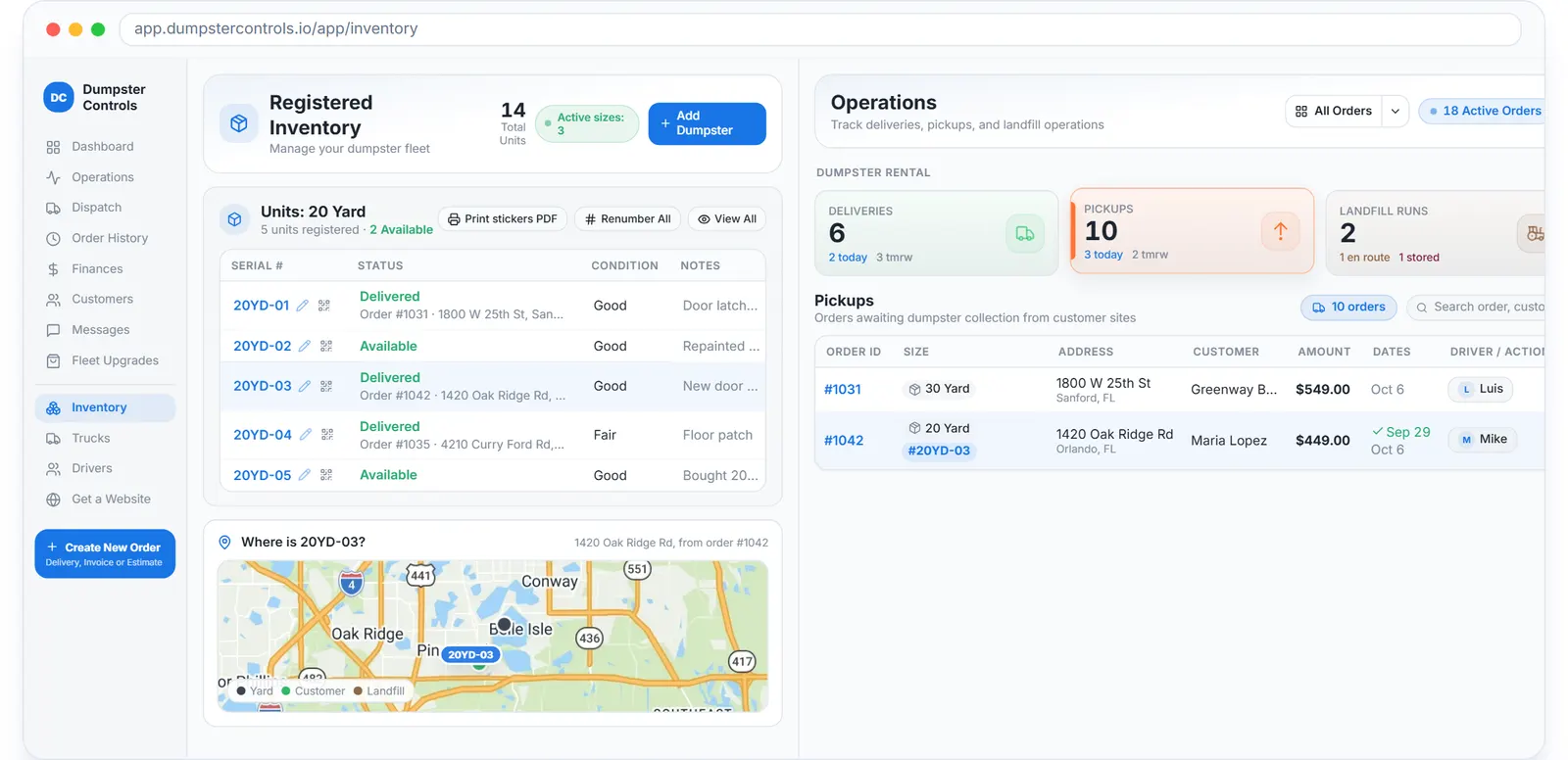
The real inventory screen: every can by serial, its status and the order it is on, sample data.
When a driver confirms a delivery, the app asks which unit went out, by dropdown or by scanning the QR sticker on the can. From then on the serial follows the order: on the order card, on the dispatch board and in the driver app.
The pickup has to collect the same unit that was delivered. If the driver scans a different can, the app shows the expected serial and stops the mistake.
Three screens, one fleet count
Registered Inventory
Sizes with prices for 24 hours, 3, 7, 14 and 30 days, extra-day charges, weight limits with per-ton overage, extra fees, and the units under each size.
Operations
Waiting Delivery, Waiting Pickup and Waiting Landfill tabs, each with search, filters, CSV export and a drawer to assign drivers or confirm a step by hand.
Booking page
Sells only the sizes you registered, at the prices from the registry, so the storefront never offers a can you do not own.
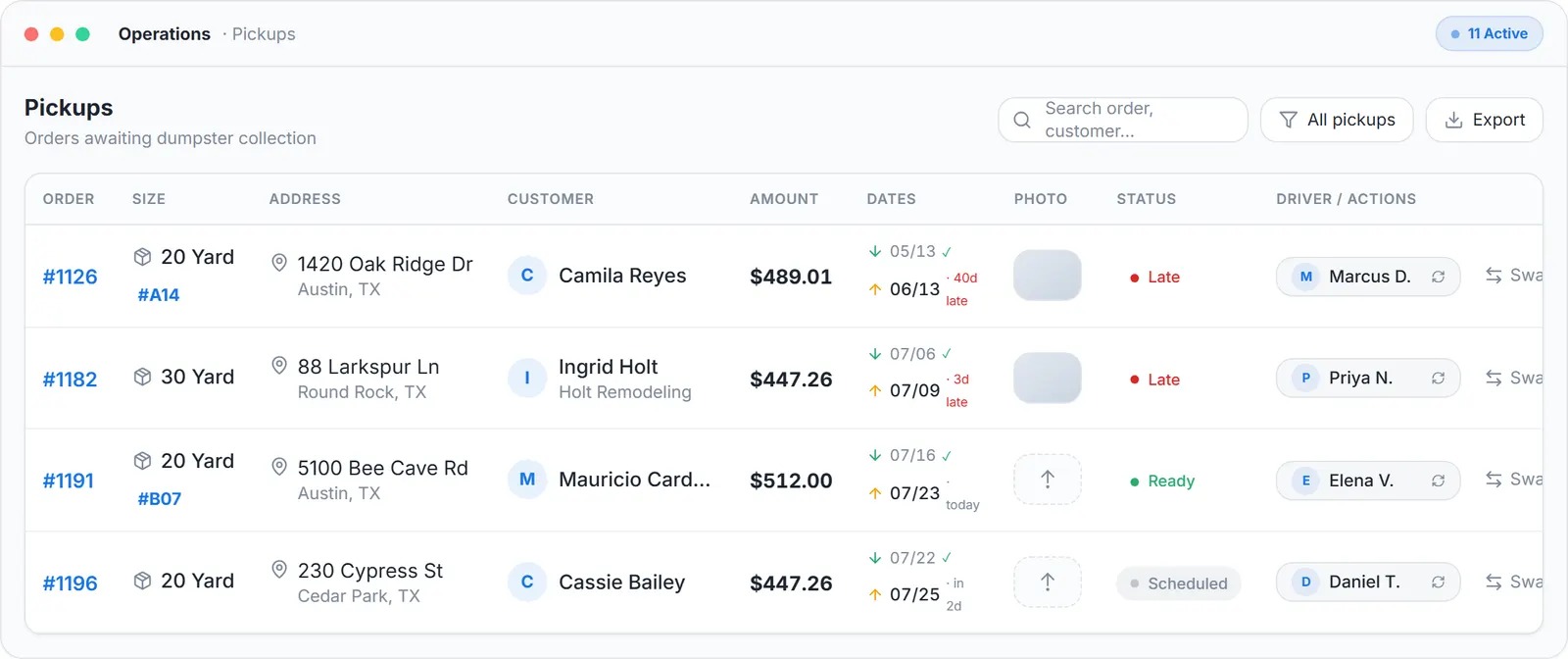
Operations: Waiting Delivery, Waiting Pickup and Waiting Landfill, with the serial on each card.
A Tuesday without dumpster inventory software
The count of 20-yard cans lives in a spreadsheet that was right in March. A driver calls from a job site because the can he was sent to pick up is a 30, not the 20 on the ticket. The office scrolls through texts to find where the other 20 went, and the customer who booked a 20 for tomorrow gets a call saying it will be a 30, same price, sorry.
Nobody did anything wrong. The information was simply in four places: the spreadsheet, the driver's memory, a text thread and the yard. A fleet of twelve cans can absorb that; a fleet of forty cannot.
The same Tuesday with the registry
Every can is a unit with a serial, 20YD-07, bound to the order the moment the driver confirms the delivery by scanning the QR sticker. The order card, the dispatch board and the driver's phone show the same serial. At pickup, the app expects 20YD-07; if the driver scans 30YD-02, it shows the expected serial and stops the mistake before the truck leaves.
The office sees how many of each size are out, at the yard or waiting for a landfill run, and the booking page sells only sizes that have units to send. The spreadsheet is gone, and so is the Tuesday call.
Roll off container inventory that the whole team edits by doing their job
No one updates the roll off container inventory by hand. A delivery confirmed in the driver app moves the unit to at site; a pickup moves it to waiting landfill or back to available; a stored full can carries its storage address until a driver is assigned to take it to the landfill. The Operations tabs (Waiting Delivery, Waiting Pickup, Waiting Landfill) are the same data, filtered.
Print QR stickers per unit from the registry, scan at delivery and pickup, and the history of each can (last order, last address, condition note) builds itself.
Before and after
Before
- Fleet count lives in a spreadsheet and in somebody's head
- Nobody knows which can sits at which address
- A pickup collects the wrong container and the customer calls
After
- Every unit has a serial, a status and a note
- The order card shows which serial is at which address
- The pickup checks the serial before the driver leaves
Try it free, no card needed
Every can registered with a serial, a status and the address it sits at.
Frequently asked questions
Related
- dumpster rental software
- dumpster container tracking
- dumpster rental software cost
- how to track containers and inventory for a hauling company
[### dumpster dispatch software
Drag-and-drop board, live map, AI route suggestions. Free.](https://dumpstercontrols.io/dumpster-dispatch-software)[### dumpster driver app
iOS and Android app: stops in order, photos, slide to complete.](https://dumpstercontrols.io/dumpster-driver-app)[### dumpster route optimization
Tresha sequences each driver's stops and shows the miles saved first.](https://dumpstercontrols.io/dumpster-route-optimization)