Finances
Dumpster rental reporting software : profit and margin on every order, not just the total
Profit and margin per order, net profit dashboard, Monthly Revenue chart.
- Profit and margin on every order row
- Net profit against the previous period
- Costs matched to bank transactions
No credit card · No contract · Forever free plan
Topicsdumpster rental reporting software profit per dumpster order roll off job costing dumpster rental P&L
Last updated September 28, 2026 Published by Dumpster Controls, built by a software group led by a founder with 20+ years in enterprise IT who also ran a roll-off business for four years
What you get on day one
- Orders P&L: Revenue, Fees, Costs, Profit and Margin per order and junk job
- Confidence status per row: Verified, Partial, Estimated, Review
- Drill-down drawer with every payment, every cost and Add Cost, Link Bank Tx, Charge Extra Fee
- Profit Intelligence card on every order in Order History, with Profit Health
- Net profit dashboard with period comparison
- Monthly Revenue chart: Received, Invoiced, Unpaid, Expenses, 6 months
- CSV export on Your Money and the Operations tabs, printable Order History report
- Bank and card reconciliation through Stripe Financial Connections
Counted in our production database on October 1, 2026. Updated monthly.
400+
Companies on Dumpster Controls
1,800+
End customers on file
140+
Trucks registered
35 states + Canada
Where it runs
What dumpster rental reporting software answers
Dumpster rental reporting software answers one question per order: what did it really make after card fees and direct costs? In Dumpster Controls that answer lives in Orders P&L, one row per order or junk job with Revenue, Fees, Costs, Profit and Margin, free for any fleet size.
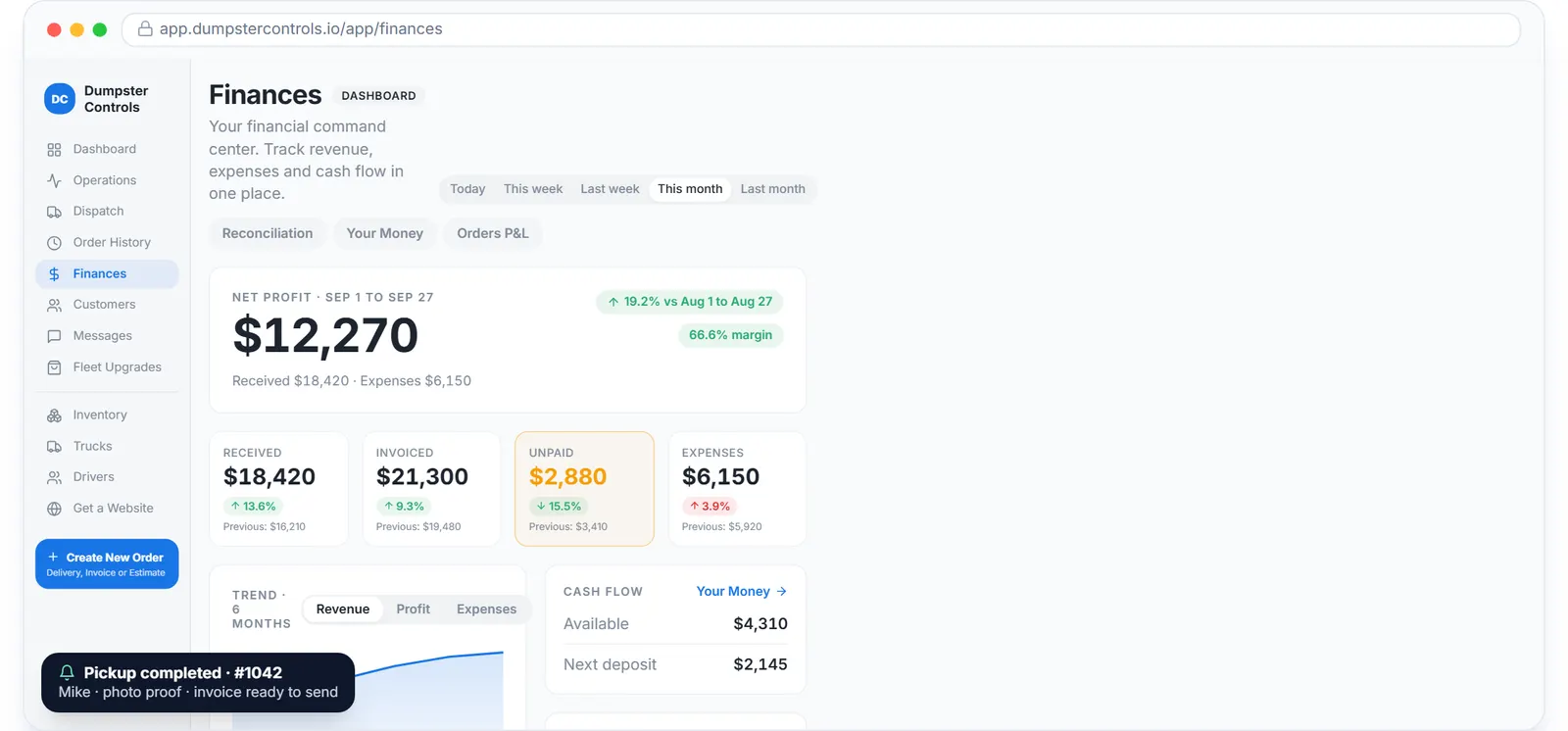
The real Finances overview, sample data.
Every row carries a confidence status so you know how solid the number is: Verified, Partial, Estimated or Review. Click a row and the drawer shows the payments and costs behind it, with Add Cost, Link Bank Tx, View Invoice and Charge Extra Fee one tap away.
The hero of the page is realized profit for the period you pick, Last 7, 30 or 90 days or All time, with the average margin and the count of orders to review.
The rest of the Finances page
Three gauges
Profit margin, Collection tank and Expense heat, read like a truck's dashboard.
6-month trend
Cash in, invoicing, unpaid balances and expenses in one chart.
Accounts receivable
Top unpaid customers and the overdue invoice totals that also feed the Alerts card.
Weekly revenue
Revenue for the current week against the previous week, with an eye button to hide the figures.
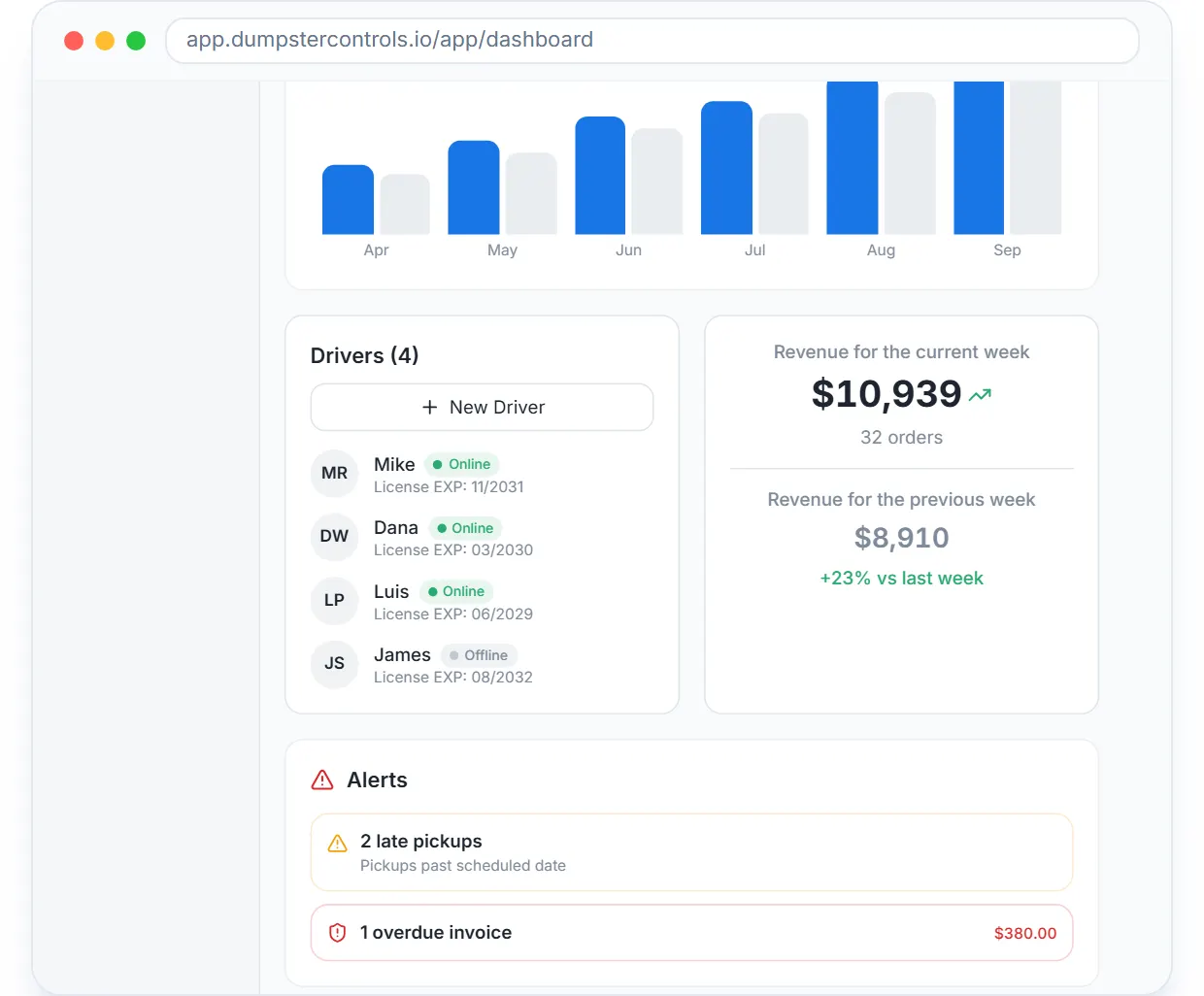
The main dashboard: weekly revenue, live map, drivers and alerts.
Profit per dumpster order, with the fee and the landfill ticket inside
Revenue is what the customer paid; Fees are the card fees actually recorded on the payment (never estimated); Costs are landfill, fuel, labor and whatever else you logged. Profit is the difference and Margin is that profit over revenue, green from 40% up, amber from 20%.
The moment a landfill cost is recorded, a cost is added or an extra fee is invoiced, the order's profit, margin and status update.
Roll off job costing software: Add Cost, From Bank, receipts
The Add Cost modal takes a manual entry (cost type, amount, vendor, description) or pulls the charge from your unmatched bank transactions with the From Bank tab, so the landfill ticket you paid by card becomes a cost on the right order.
Completed orders without a landfill cost are flagged "No landfill cost" and marked for review, because landfill is usually the biggest direct cost of a haul.
Dumpster rental P&L on the Finances dashboard
The Finances page opens on net profit for the period with Received, Invoiced, Unpaid and Expenses compared against the previous period, a 6-month trend, the Cash flow card with your next deposit and the Accounts receivable card.
The main dashboard's Monthly Revenue chart shows the last 6 months of Received, Invoiced, Unpaid and Expenses, with the previous month and the current month side by side.
Profit Intelligence on every order in Order History
Expand an order in Order History and the Profit Intelligence card shows a revenue vs costs donut, the cost breakdown (Landfill, Fuel, Driver Labor, Repairs, Other), the margin and a Profit Health verdict: Strong, Average or Weak, with a short tip.
Customer-billed charges like overweight or damage are always counted as revenue, never as company costs.
Before and after
Before
- Gross revenue known, profit per job unknown
- Landfill and fuel costs reconciled at tax time
- Unpaid invoices found when the bank balance looks wrong
After
- Profit and margin on every order row
- Costs matched to bank transactions as they happen
- Unpaid tile and overdue alerts on the dashboard every morning
Try it free, no card needed
Profit and margin per order, net profit dashboard, Monthly Revenue chart.
Frequently asked questions
Related
- dumpster rental software
- dumpster invoicing software
- dumpster rental software with QuickBooks
- dumpster rental software cost
- how to run a junk removal business with one app
[### dumpster invoicing software
An invoice for every order, payment links, reminders for 5 days.](https://dumpstercontrols.io/dumpster-invoicing-software)[### dumpster rental payment software
Cards online, by phone and on file. Payouts to your own bank.](https://dumpstercontrols.io/dumpster-rental-payment-software)[### dumpster SMS reminders
Confirmation, on the way, delivered, invoice and payment reminders, texted for you.](https://dumpstercontrols.io/dumpster-rental-sms-reminders)