QUICKBOOKS FOR YOUR DUMPSTER COMPANY, FREE FOR ANY FLEET SIZE
Dumpster rental software with QuickBooks integration
Your dumpster invoices, payments, refunds and dump fees land in QuickBooks Online minutes after they happen, with the same totals your customer saw and no duplicates, and nothing your accountant does there touches an order. One way by design. The Finances screen at the top of this page is the real one, with sample data. Free for any fleet size, USA and Canada.
- Every synced invoice carries a DC- number and the exact customer-facing total
- Customers matched by email before anything is created
- Expenses and dump fees become Purchases with the vendor attached
- Import your QuickBooks customers in one click, safe to re-run
Get the Free SoftwareSee features
4.7 on the App Store Available in all 50 US states and Canada
Last updated October 12, 2026 Published by Dumpster Controls, built by a software group led by a founder with 20+ years in enterprise IT who also ran a roll-off business for four years
Dumpster rental software with QuickBooks integration sends what happens in the operation into your books without re-typing: each customer, invoice, payment, refund and dump fee in Dumpster Controls becomes the matching record in QuickBooks Online, one way, within a couple of minutes, with the same total the customer saw. It is on the free plan of our dumpster rental software, for any fleet size, from one truck up.
The accountant's complaint about hauling software is never that the sync is missing. It is that the sync did something: an invoice re-created twice, a payment applied to the wrong customer because two John Smiths share a name, a total three cents off after QuickBooks recalculated the tax. The integration is judged on those three failures and avoids each one by rule rather than by luck. The manual documents it in ten articles, edge cases included, at /help/quickbooks.
What you get on day one
- Connect in one click to Intuit: sign in, choose the company, authorize, green Connected badge
- Customers matched by email first, so nothing duplicates
- Invoices numbered DC- plus your number, with the exact customer-facing total
- Fuel surcharge, card fee and sales tax as their own lines
- Payments posted against their invoice, refunds as credit memos
- Dump fees and expenses as Purchases with the vendor attached
- Import your active QuickBooks customers in one click, safe to re-run
- A sync log with Synced, Pending and Failed on every item
Counted in our production database on October 1, 2026. Updated monthly.
400+
Companies on Dumpster Controls
1,800+
End customers on record
540+
Users with a login
35 states + Canada
Where it runs
Sync dumpster invoices to QuickBooks: what each item becomes
From the moment you connect, new activity flows to QuickBooks within a couple of minutes. Historical data from before the connection is not sent, on purpose: your existing books were built by your accountant and the integration leaves them alone.
| Feature | Becomes in QuickBooks | The rule that prevents the mess | Free plan |
|---|---|---|---|
| Customer | Customer with name, email, phone, billing address | Searched by email first, then display name; a name-only match creates a new customer with a DC- suffix instead of merging strangers | |
| Invoice | Invoice numbered DC- plus your invoice number | Fuel surcharge and card fee as their own lines, sales tax as an explicit line; if the lines do not sum to the total, one line with the exact total is sent instead | |
| Payment | Payment linked to its invoice, method in the note | Payments marked excluded from finance are never sent; a payment edited after syncing is flagged in the log, never rewritten | |
| Refund | Credit memo for the refunded amount | Carries the actual refunded amount, net or full; an unusual case fails into the log instead of guessing | |
| Expense and dump fee | Purchase against a Dumpster Controls Clearing account, vendor attached | Your real bank registers are never touched; charges billed to customers are never exported as expenses | |
| Voided invoice, super invoice, history | Not exported | A void after sync raises an alert asking you to void it in QuickBooks; grouped invoices skip because their children already export |
Each entity and how it lands in QuickBooks Online, per the data mapping reference in the manual.
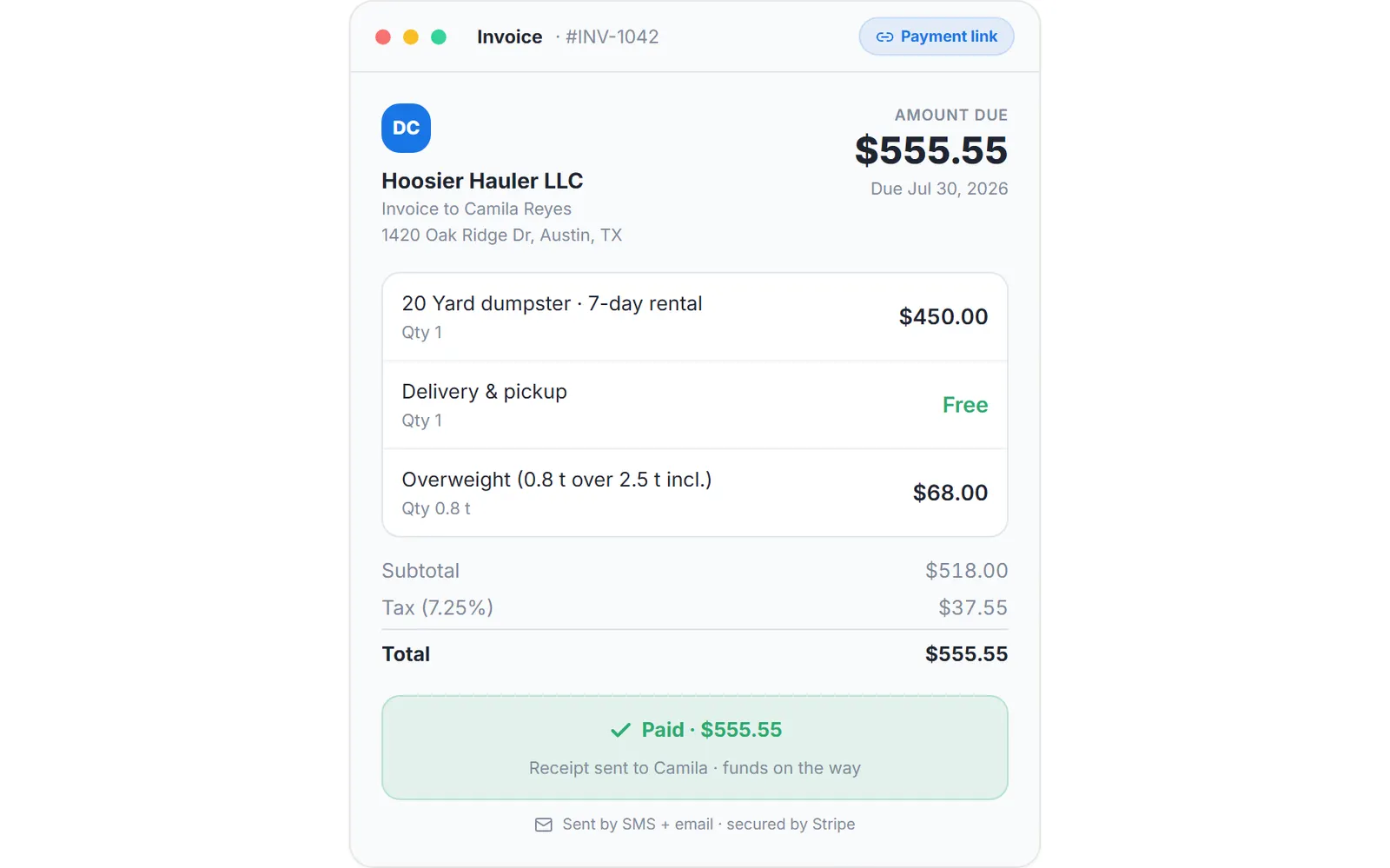
The invoice as the customer sees it from the payment link, sample data.
Refunds that reach QuickBooks on their own
A customer cancels a paid order. Click Cancel & Refund in Order History and the rest follows.
- The Decline Order dialog shows the charge, the cancellation fee and what goes back to the card, before you confirm.
- The refund goes out through Stripe and the order reads Declined.
- The same step queues the QuickBooks sync: within a couple of minutes the refund is a credit memo for the amount actually refunded, and the sync log turns from Pending to Synced.
Your books match the money that actually moved, without anyone typing a credit memo by hand.
Why the QuickBooks sync is one way
The tempting version of an integration writes in both directions, and it sells well in a demo. It is also where duplicate payments and silently overwritten invoices come from, because two systems with two sets of rules are each allowed to be the source of truth for the same dollar, and the second write always wins without asking.
Before
- Two-way sync: edit a payment in QuickBooks and it changes in the operations software
- Two sources of truth for the same dollar; the second write wins
- Duplicate payments and silently overwritten invoices
- The accountant's re-categorization fights the software
After
- Dumpster Controls is the operational source of truth; QuickBooks receives a faithful mirror
- Nothing in QuickBooks can modify an order, an invoice or a payment in Dumpster Controls
- Your accountant re-categorizes accounts, renames the service item's account and adds memos freely
- The one flow that runs the other way, the customer import, is started by you and never overwrites a record
The Free Forever Promise
Free means free. Forever.
The QuickBooks Online sync, the customer import and the sync log are on the free plan, with no add-on fee and no tier to reach.
$0
Monthly fee
Ever. No surprise charges.
$0
Setup fee
No onboarding cost.
$0
Per-user fee
Unlimited admins, drivers, dispatchers.
$0
Annual contract
Cancel anytime. We never auto-charge.
How we make money: only when you opt in, and the numbers are public. The software is free with unlimited orders and no per-order software fee. If you choose to collect a customer’s card payment through Dumpster Controls, the processing fee is 2.99% + $3.99 per card transaction on the free plan, or 2.99% + $0.30 (the standard Stripe rate) on the optional $169/month lower card rate plan. Take payment by cash, check, Zelle or any other way and you pay nothing at all. Beyond that, our revenue comes from the optional lower card rate plan and from equipment partners and sponsors advertising in the app and on our public directory; our marketplace, the Dumpster Net Hub, charges zero marketplace fees. Run your own business your way and you never pay to use the software. It’s the only model that lets a 1-truck owner-operator run on the same software as a 50-truck fleet.
QuickBooks for a dumpster company: the dump fee and the customers you already have
Two things are specific to hauling: the dump fee, and the customer base you already have in QuickBooks Online.
The dump fee becomes a Purchase
A per-order cost recorded on the order, with the receipt photo and the net weight read off it by the dumpster driver app, becomes a QuickBooks Purchase with the landfill as the vendor and the order number in the description. Fuel, maintenance and insurance recorded under Finances, Expenses sync the same way.
Charges you bill to a customer, overweight or extra days, are never exported as expenses; they already reach QuickBooks on the revenue side through the invoice.
Your QuickBooks customers come in
Import from QuickBooks, offered right after connecting and available any time from the Customers page, the Finances page or the QuickBooks tab, brings in active customers with names, emails, phones and addresses. Pick one on New Order and the contact data is already filled. The customer record that receives them is shared by dumpster orders and junk jobs.
The first invoice to an old customer takes seconds.
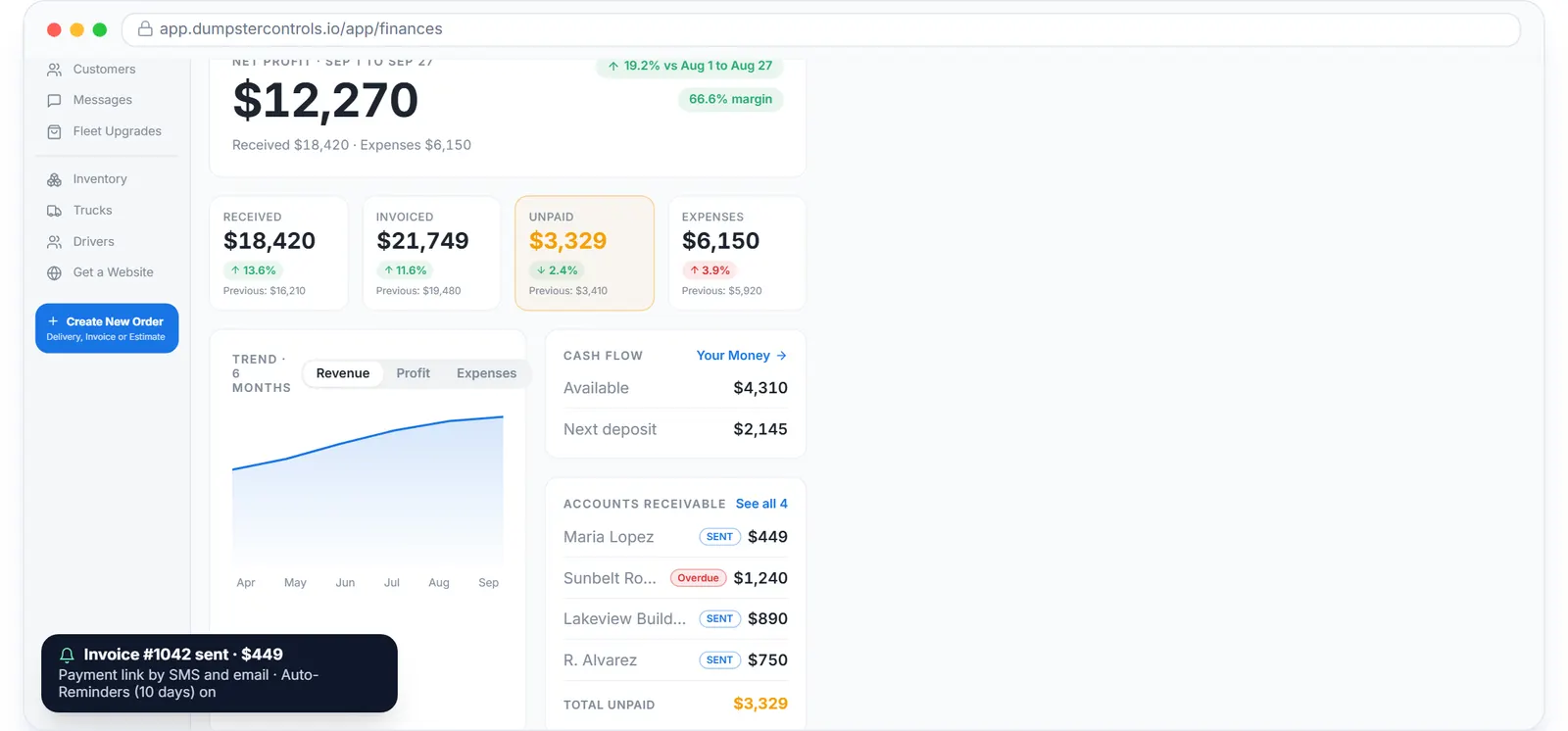
Receivables aging, sample data. What is still owed lives in the software; the invoice reaches QuickBooks when issued and the payment when it lands.
Online orders: dumpster booking software. Invoices and reminders: dumpster invoicing software. Junk jobs: software for junk removal.
Nothing fails silently
The sync log in the QuickBooks tab lists every item with a status, and nothing in your operation ever waits for QuickBooks.
Synced, Pending, Failed
Pending is normal; the worker runs every couple of minutes and retries at 1, 5, 30 and 120 minutes, up to five attempts. Failed items show the reason and Intuit's own transaction id, the intuit_tid, which Intuit support can look up.
A durable queue
Events go to a durable queue in the same transaction as the change, so the dispatch board, the booking page and payments continue if Intuit is slow or down. A broken or revoked connection pauses the sync, shows a reconnect warning, and failed items replay when you reconnect.
Security and control
The connection uses Intuit's OAuth flow; Dumpster Controls never sees your Intuit password. Tokens are encrypted at rest and bound to your company, only owners and admins can connect, disconnect or read the log, and the integration holds the minimum accounting scope.
Disconnect from the app or from your Intuit account and syncing stops immediately, with everything already in QuickBooks left in place. Reconnect the same company later and it links back to the same records instead of duplicating.
Where QuickBooks fits in the rest of the platform
QuickBooks is the ledger; the operating numbers live in the software. The Finances dashboard leads with net profit and the four tiles that explain it, Orders P&L gives every order and junk job a row with revenue, fees, costs, profit, margin and a confidence status, and Your Money follows each card payment from charge to bank deposit.
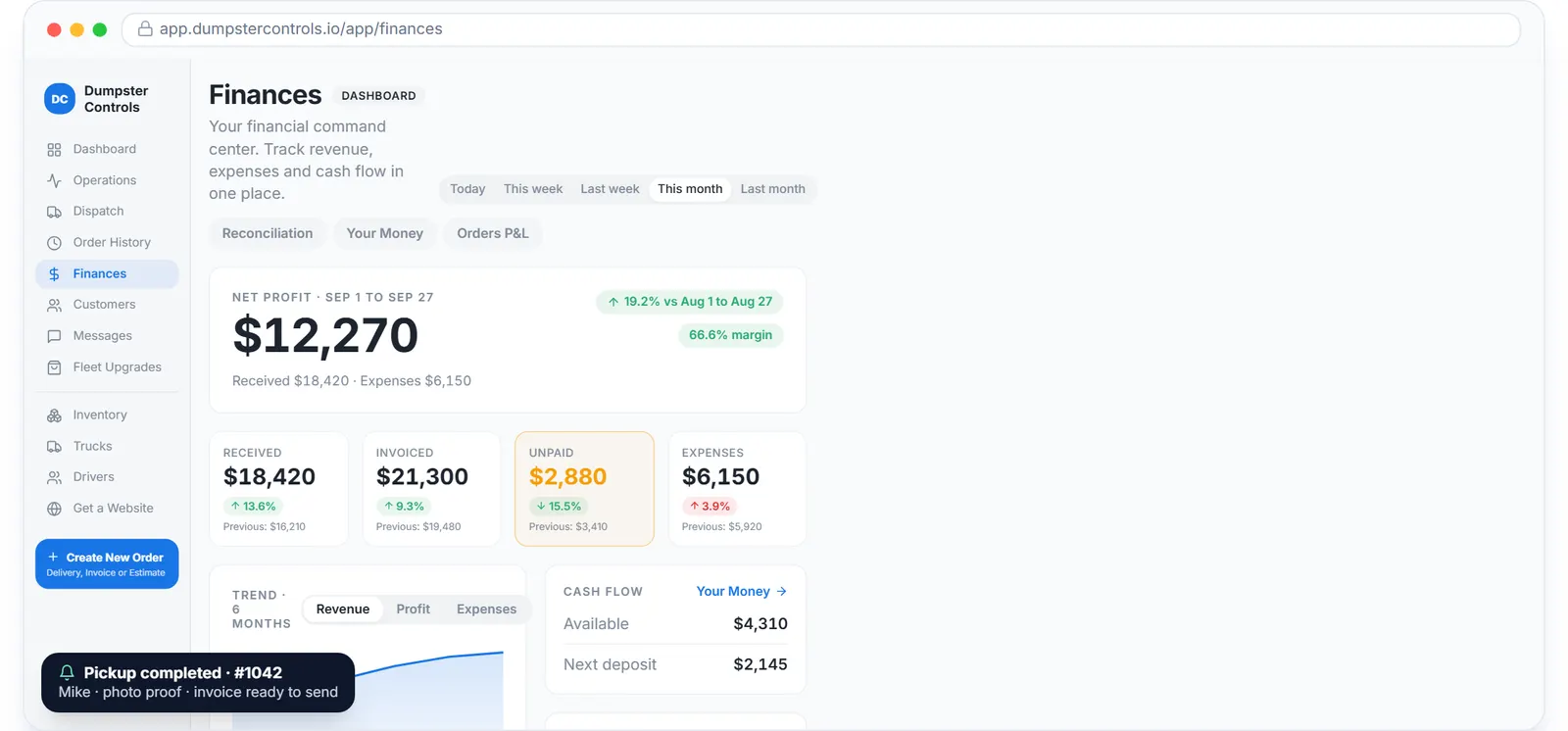
Revenue by week with received, invoiced and expenses, sample data. The ledger gets the same numbers, a couple of minutes later.
The dumpster financial software guide walks those screens, dumpster business software is the owner's view of them, and dumpster rental software cost notes which vendors sell the QuickBooks connector as a paid add-on.
Keep reading
- Online booking and billing automation in one platform
- How to automate billing for a junk removal company
- How to get paid faster as a junk removal company
Dumpster rental software with QuickBooks integration: FAQ
Topicsdumpster rental software with quickbooks integration quickbooks for dumpster company sync dumpster invoices to quickbooksdumpster software quickbooksquickbooks online for dumpster rental companiesroll off software quickbooks sync dumpster financial software