THE APP FOR DUMPSTER DRIVERS, FREE FOR ANY FLEET SIZE
Dumpster driver app that runs the stop for you
Today's stops in order, On My Way, I've Arrived, the stamped photo, the can you dropped, slide to complete. The phone at the top of this page is the real app, working three stops on sample data.
- Free for any fleet size: unlimited drivers, no per-seat fee, iOS and Android
- Photo proof stamped with the date, time, location and company name
- Unit picker by list, QR scan or typed label, so the right can is on the order
- Truck Tablet Mode for a tablet mounted in the cab, drivers switch by PIN
Get the Driver App FreeSee features
4.7 on the App Store Available in all 50 US states and Canada
Last updated October 12, 2026 Published by Dumpster Controls, built by a software group led by a founder with 20+ years in enterprise IT who also ran a roll-off business for four years
A dumpster driver app is the phone app a roll-off driver uses to run the day: the stops in order, directions to each one, the photo that proves the drop, and the tap that tells the office the stop is done. In Dumpster Controls the driver app comes included with the dumpster rental software, free for any fleet size, on the App Store and Google Play with the same login as the office. The phone at the top of this page is the real app replaying three stops on sample data: the list, On My Way, the route bar, I've Arrived, the stamped photo, the unit picker and slide to complete.
It replaces the group text, the paper route sheet and the "where are you?" calls, because every tap in the cab moves a card on the dispatch board.
What you get on day one
- Native iOS and Android app, same login as the office
- Today's stops in order, with turn-by-turn directions
- Swipe to complete, with a photo stamped by GPS and time
- Swap handled as one task: pick up the full, drop the fresh
- Offline queue: complete stops with no signal, they sync in order later
- Live GPS to dispatch every 30 seconds while a route is active
- Push notification with sound the moment a stop is assigned
- Truck Tablet Mode for a tablet mounted in the cab, with a 4 digit PIN
Counted in our production database on October 1, 2026. Updated monthly.
400+
Companies on Dumpster Controls
190+
Drivers registered
140+
Trucks registered
35 states + Canada
Where drivers use it
What the dumpster driver app does at every stop
Roll-off drivers do 12 to 25 stops a day across delivery, pickup, swap and dump runs. Most field-service apps assume one tech, one job, one invoice. This one models the roll-off day, and the demo above is that day, tap by tap.
- 1
#### 01. Driver opens the app
My Tasks lists today's stops in running order with the type on a colored edge, the customer and the time window. - 2
#### 02. Taps On My Way
A driving timer starts and dispatch sees the stop as started. Open Map hands the address to Google Maps, and the route bar shows the minutes to the next stop. - 3
#### 03. Taps I've Arrived and takes the photo
The sheet asks for the After Delivery photo, stamped with the date, time, location and company name by itself. - 4
#### 04. Picks the can
Which dumpster did you drop? Pick the unit from the list, scan the QR sticker on the can, or type the label painted on it. - 5
#### 05. Slides to complete
Drag all the way right: confetti fires, the stop turns Done in the list and the next one is up. No photo? The control says so and lets you complete anyway; a landfill run is the exception.
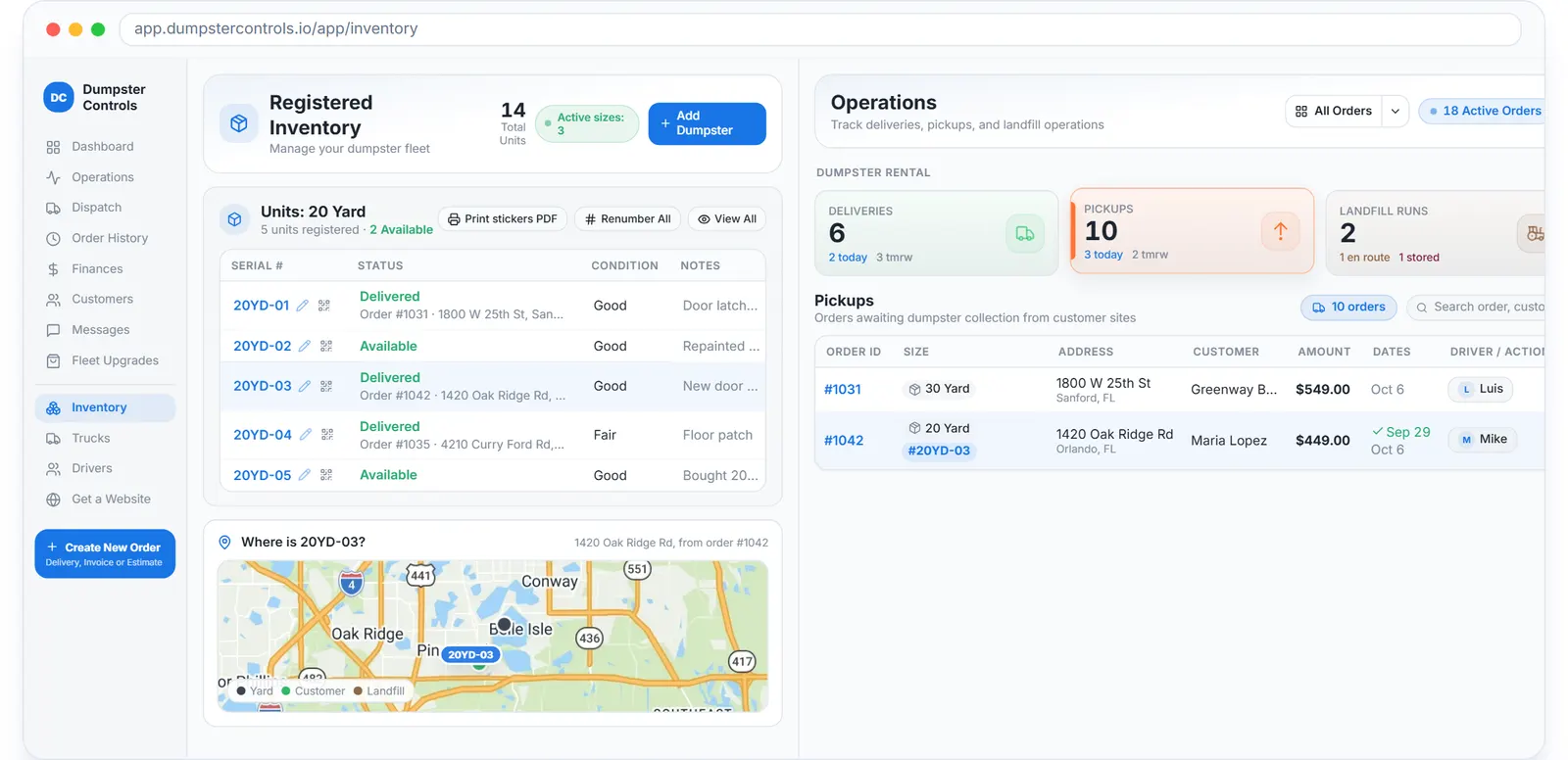
The list the unit picker reads from: every can by serial and status, sample data.
What this means for you
- There is little to train: a stop shows only what that stop needs.
- Every completion has a stamped photo, so a placement dispute is a lookup, not a phone call.
- Dispatch knows a stop is done the second it is swiped.
The Free Forever Promise
Free means free. Forever.
The driver app is free for any fleet size: iOS, Android, photo POD, GPS, offline queue. Unlimited drivers, no per-seat fee.
$0
Monthly fee
Ever. No surprise charges.
$0
Setup fee
No onboarding cost.
$0
Per-user fee
Unlimited admins, drivers, dispatchers.
$0
Annual contract
Cancel anytime. We never auto-charge.
How we make money: only when you opt in, and the numbers are public. The software is free with unlimited orders and no per-order software fee. If you choose to collect a customer’s card payment through Dumpster Controls, the processing fee is 2.99% + $3.99 per card transaction on the free plan, or 2.99% + $0.30 (the standard Stripe rate) on the optional $169/month lower card rate plan. Take payment by cash, check, Zelle or any other way and you pay nothing at all. Beyond that, our revenue comes from the optional lower card rate plan and from equipment partners and sponsors advertising in the app and on our public directory; our marketplace, the Dumpster Net Hub, charges zero marketplace fees. Run your own business your way and you never pay to use the software. It’s the only model that lets a 1-truck owner-operator run on the same software as a 50-truck fleet.
The tablet in the truck: Truck Tablet Mode for the dumpster driver app
An Android tablet fixed in the truck becomes a landscape cockpit: the day's tasks in dispatch order next to Google Maps in split screen. The driver taps Go to address on the phone and the paired tablet opens navigation by itself; a landfill trip navigates to the landfill or the yard, not to the customer. The stop closes with a hold button and proof photos, and with no signal the work queues on the device and syncs when the signal returns.
On a tablet the app becomes a different product. The day list sits on the left, the live route map on the right, and a vertical rail holds the handful of things a driver touches while working. Every control is at least 48x48 pixels and no text is smaller than 14 pixels.
The tablet is paired to the company, not to a person. A "Who is driving?" screen lists the drivers with photos; the driver taps a face, types a 4 digit PIN, and every stop and photo is attributed to that person. No shared login, no personal phone, no data plan to depend on.
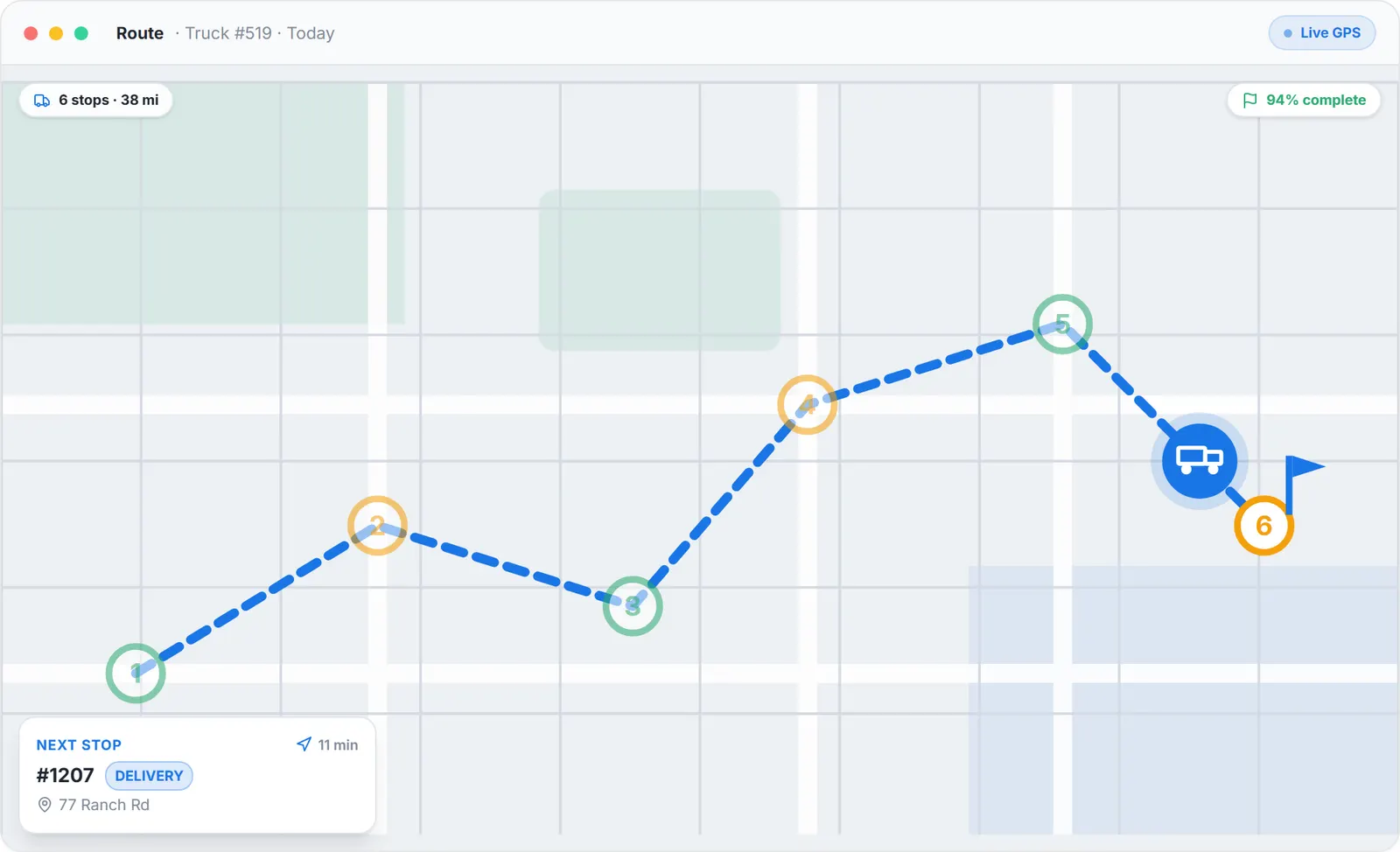
The route panel of the dispatch board, sample data.
One trip at a time
A roll-off truck carries one container. The map draws the leg being driven now and dims the rest of the day.
Solid or dashed
Solid line: carrying a container. Dashed: running empty. Both derived from the stop sequence, nobody types it.
Drawn where the truck goes
Landfill runs are drawn at the landfill, and a trip starts at the yard when the full can slept there.
What this means for you
- Any Android tablet works. No hardware is sold, no per-device fee, no contract.
- A shared truck still attributes every stop to the individual driver.
- The complete guide is public before signup at /help/driver-tablet.
App for dumpster drivers: built for gloves, no signal and swaps
Big buttons, voice too
Every primary action is at least 56 pixels tall, so it works with work gloves on. Tresha, the built-in AI assistant, works by voice from the cab: ask about the day and complete stops, confirmed with one tap.
Offline queue with a sync badge
Completions, photos, reorders and shift start or end queue on the device and replay in order. The badge never says synced while something is waiting.
Swap as one motion
Pickup full, drop fresh is one task in the app, so revenue is never double-counted and the customer is never billed twice.
Driver role isolation
Drivers see address, container size, instructions and dump destination. They do not see prices, card data or other drivers' routes; enforced server-side with Row-Level Security.
Push on assignment
New assignments arrive with sound within 2 seconds. No waiting for the next manual refresh.
Live GPS to dispatch
Location every 30 seconds while a route is active. Green dot live, grey dot stale after 5 minutes without movement.
No signal at the job site: the stop still gets done
New subdivisions, back roads and landfills are where the bars disappear. The driver app keeps going.
- A banner says "You are offline. Keep working", and the proof photo is saved on the phone with "Saved, will upload when online".
- The driver completes the stop with no signal. The completion waits in line behind the photo, in the order it happened.
- When the signal returns the phone sends both once. Each action carries its own event id, so a retry never doubles a stop, and the board shows the real completion time.
No proof lost to a dead zone, and no call from the office asking whether the drop happened.
Driver app for a dumpster company: what dispatch sees while the driver drives
Every swipe in the cab moves a card in the office. The operations view lists the day's orders with status and assigned driver, and the board updates live.
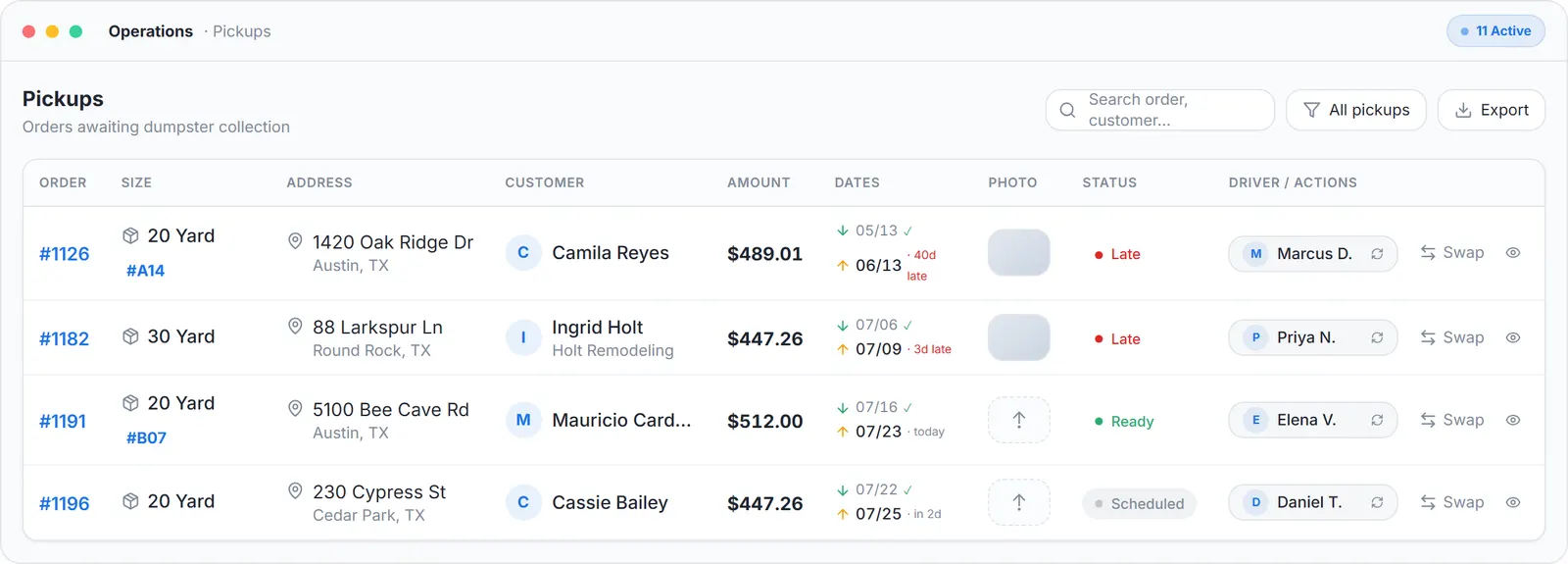
Operations view, sample data.
What this means for you
- The board is the truth, so radio chatter drops. See dumpster dispatch software.
- A late stop is visible before the customer calls about it.
- Completed pickups can trigger the invoice. See dumpster invoicing software.
The customer thread stays with the order
The customer gets the on-the-way and delivered messages automatically from the order. When the driver completes the stop, the proof and the conversation are in the same place.
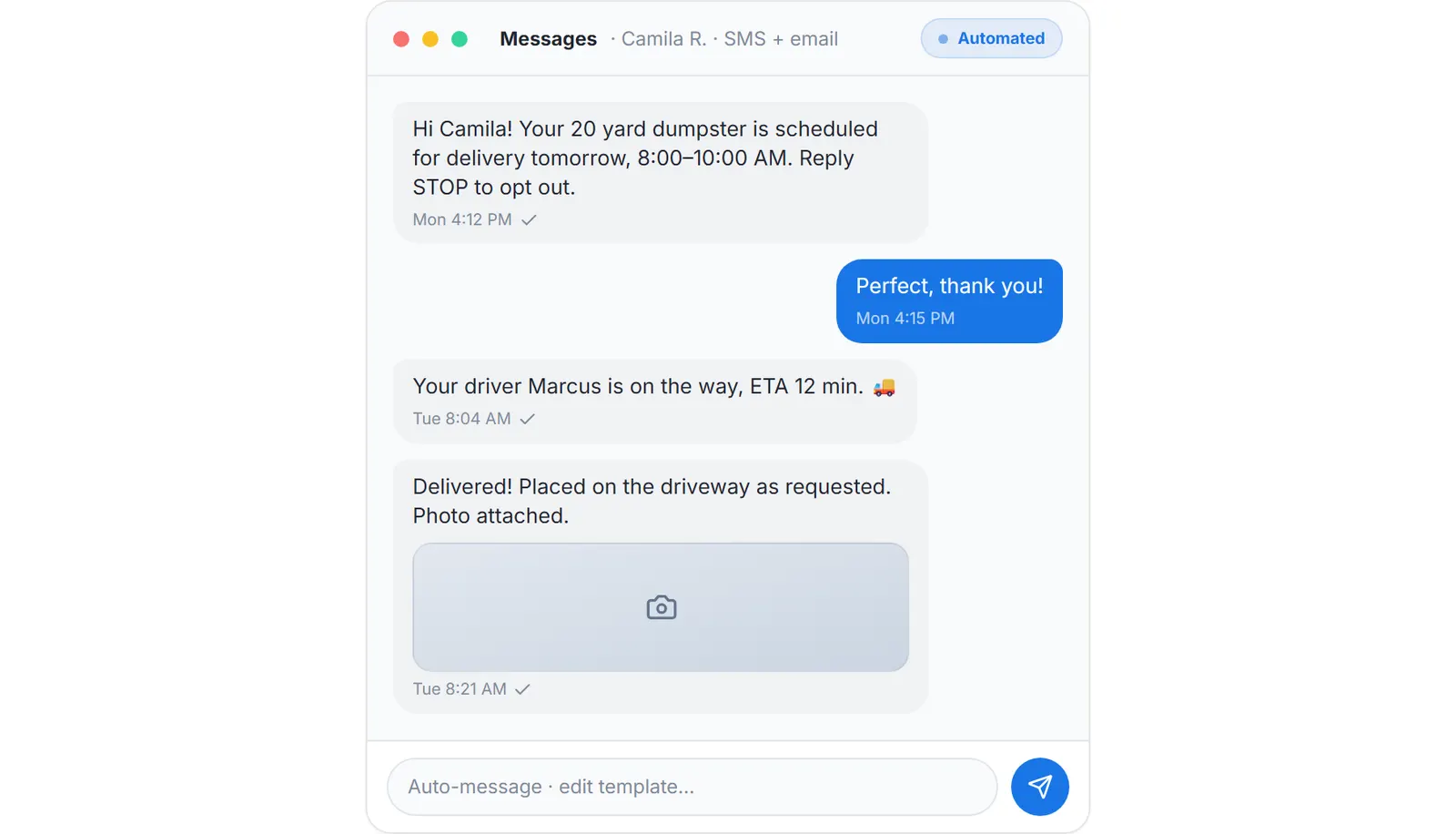
What the customer receives automatically at delivery, sample data.
What this means for you
- Gate codes and placement notes reach the driver as instructions, not as a forwarded screenshot.
- A customer asking where the truck is gets an answer from the live map.
- Stamped photos stay on the order, and the office can share any of them in a minute. Guide: how to send proof of service photos to customers automatically.
Roll off driver app on both stores
If you searched for a roll off driver app, a dumpster company app or an app for dumpster rental, this is it. Owners run dispatch and finances, drivers run their routes, all from the phone. The driver's own view, the four kinds of stop and the receipt scan, is on the roll off driver app page.
Dumpster driver app vs competitors
| Feature | Dumpster Controls | Hauler Hero | DRS | Generic field app |
|---|---|---|---|---|
| iOS + Android | ||||
| Offline mode | Limited | |||
| Swap workflow | ||||
| Photo POD + GPS stamp | Add-on | |||
| Driver PII isolation | ||||
| Live GPS to dispatch | Add-on | Add-on | ||
| Free plan | Unlimited drivers |
Competitor features change; confirm with each vendor. What the paid vendors charge is on dumpster rental software cost.
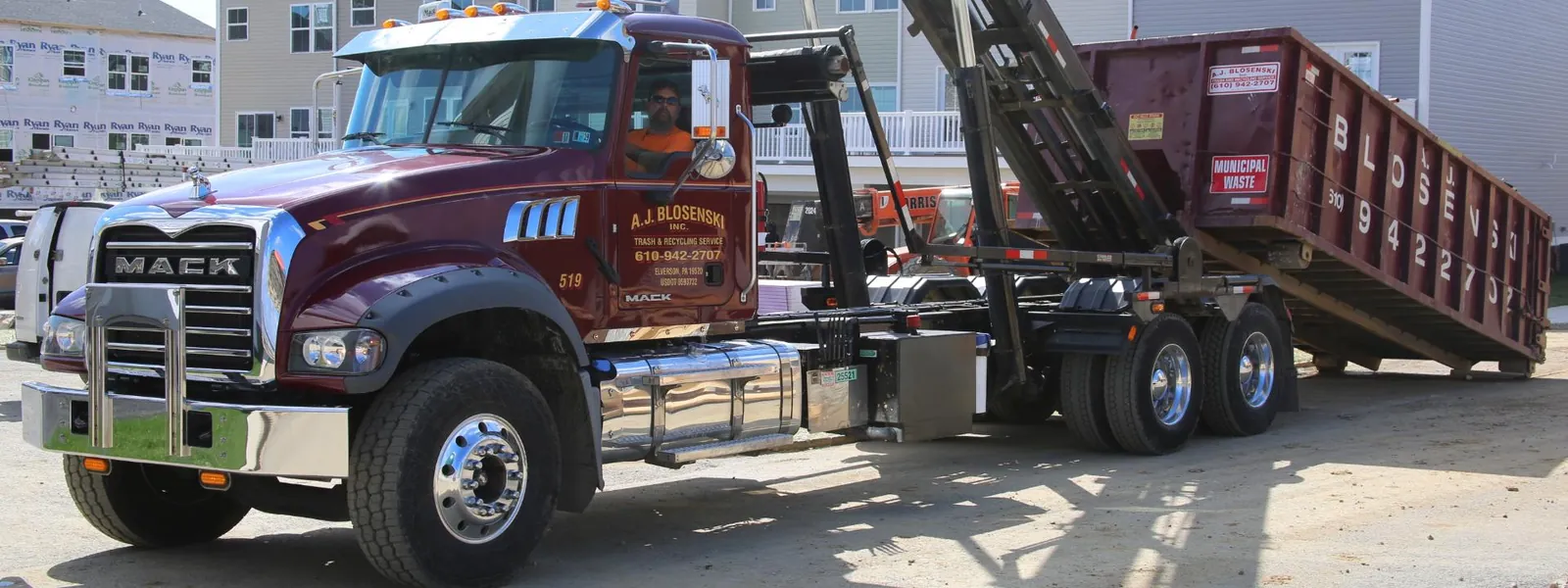
A roll-off delivery at a residential construction site. Photo courtesy of A.J. Blosenski Inc. , Elverson, PA 610-942-2707Used with permission.
Keep reading
- How to improve driver support for a waste management company
- How to provide proof of service for junk removal customers
- Dumpster booking software, where the stops come from
Dumpster driver app: FAQ
Topicsdumpster driver app app for dumpster driversroll off driver app driver app for dumpster company free driver app haulersGPS driver app dumpster photo POD driver app offline driver app dumpster