Operations
Landfill management software that shows the real dump cost before the truck leaves
Nearby landfills with tipping fees, real cost per dump, ratings, and the ticket on the order.
- Nearby landfills sorted by Nearest, Top Rated, Most Reviewed or Cheapest
- View dump cost: a Real Cost (est.) per gate from its fee and the tonnage you usually haul
- Ticket photo, net weight and landfill cost on the order, with Receipt scan in the driver app
No credit card · No contract · Forever free plan
Topicslandfill management software landfill tipping fees near me dump ticket software
Last updated September 28, 2026 Published by Dumpster Controls, built by a software group led by a founder with 20+ years in enterprise IT who also ran a roll-off business for four years
What you get on day one
- Nearby Landfills from the Dashboard: name, star rating, tipping fee block, address, phone and hours, with the distance from your company address
- Search by name, city, zip or county, and chips for Nearest, Top Rated, Most Reviewed and Cheapest
- View dump cost on any card: Real Cost (est.) for 2 to 10 tons or 10 to 40 yards, with a Verified, Reported or Unknown badge on the price
- Report a price update, or Add price info when a gate has no fee on file yet
- Favorites shared with your whole company, sorted first in the dispatcher's and the driver's landfill pickers
- Ratings and reviews visible to every hauler in the app, with Details and Get Directions on each landfill
- Private landfills your company adds, and Suggest Landfill for gates missing from the catalog
- Nearby Landfills layer and Landfill Radius on the Dashboard map; the dump run drawn as a stop on the Dispatch route
Counted in our production database on October 1, 2026. Updated monthly.
1,750
Landfills in the open database
Distance and tipping fees where published
400+
Companies on Dumpster Controls
140+
Trucks registered
35 states + Canada
Where it runs
What landfill management software does before, during and after the dump run
Landfill management software in Dumpster Controls starts on the Dashboard: the Landfills button opens Nearby Landfills, a list of gates sorted by distance from your company address with the tipping fee, a star rating from other haulers, the address, the phone and the hours. View dump cost on any card shows a Real Cost (est.) for the tonnage you usually haul, and the Cheapest chip ranks gates by that estimate rather than the sticker price. It is free for any fleet size.
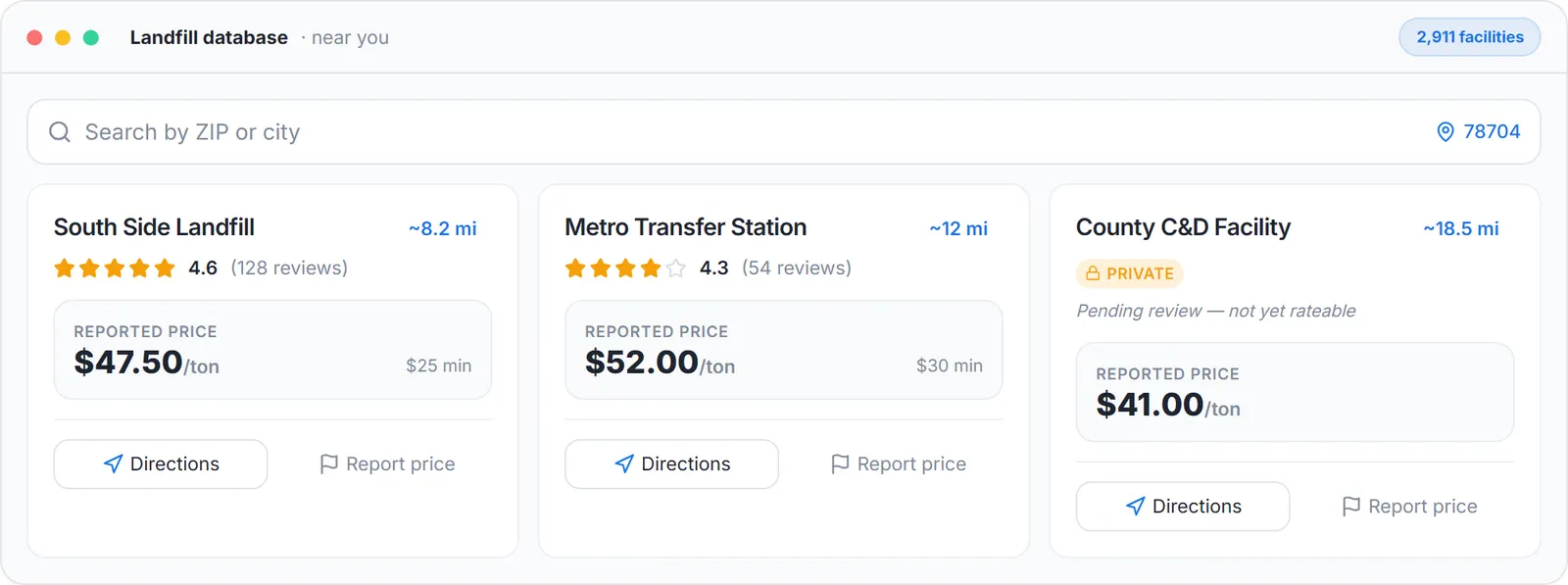
The landfill run: the driver picks the landfill from the list with its fee, sample data.
Every price carries a badge: Verified (confirmed by Dumpster Controls), Reported (sent by a hauler, pending review) or Unknown. When a gate changes its fees you Report the update, and when the gate added surprises you enter the estimated extra fees per dump so the estimate includes them.
After the run, the landfill ticket lives on the order: net weight in tons, landfill cost and the ticket photo, read off the receipt by Receipt scan in the driver app. That cost feeds the order's P&L, and an overweight load opens the alert with Waive, Charge Card on File or Send Invoice.
Four ways to sort the same gates
Nearest
The default: by distance from your company address, with the ~mi badge on every card.
Top Rated
Best community rating first, from the stars haulers tap on the cards and the reviews they leave.
Most Reviewed
The gates with the most ratings first, when you would rather trust a crowd than a single five-star.
Cheapest
Uses estimated real cost including typical fees, so the ranking follows what a dump actually costs, not the sticker rate per ton.
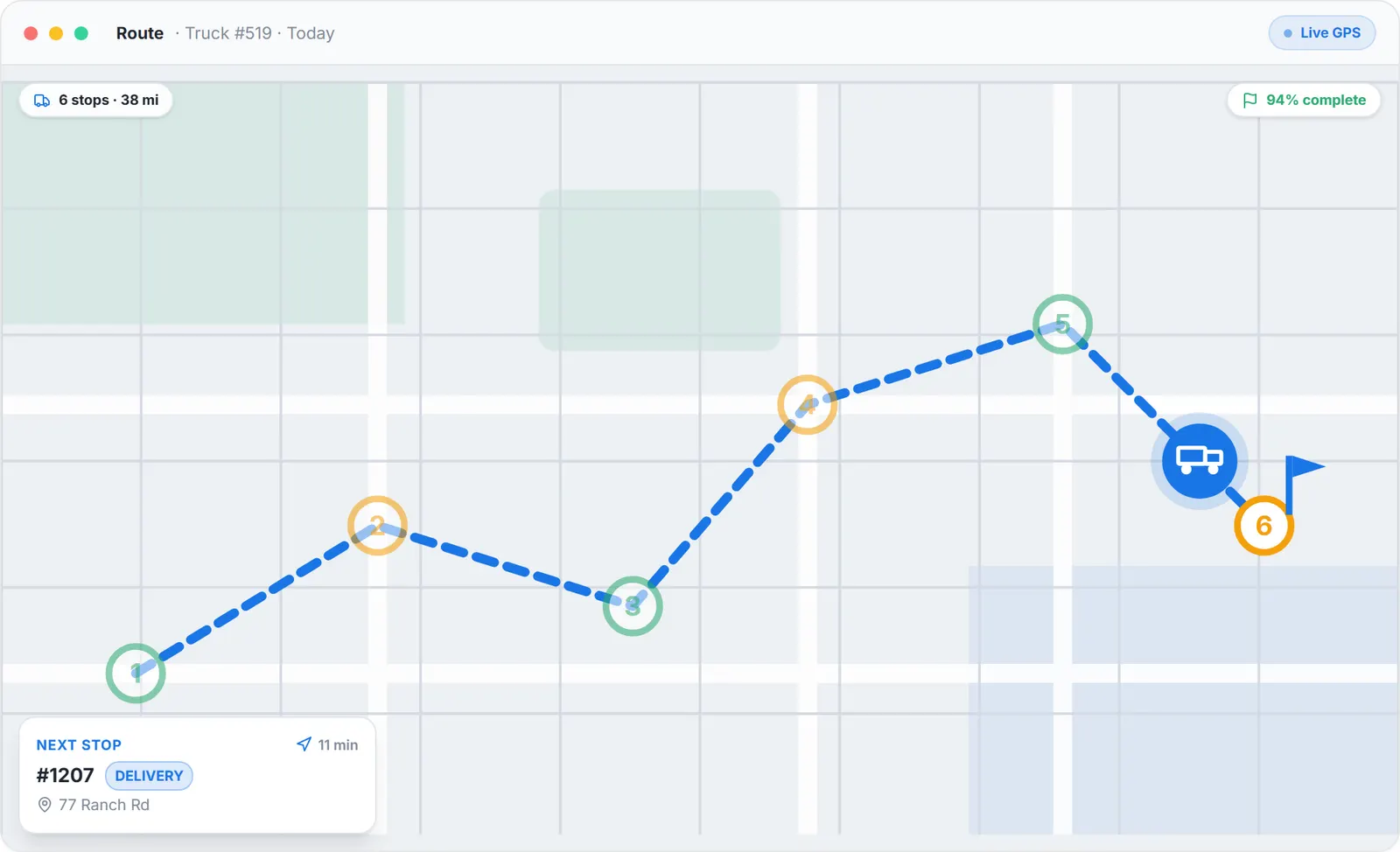
The dump run is a stop on the route, drawn at the landfill you set.
Landfill tipping fees near me: the real cost per dump, not the rate per ton
The pricing block on each card is labeled Per Ton or Per Yard and shows the base rate, for example $78 / ton, with the date the price was last updated. View dump cost expands a Real Cost (est.) box with a dollar figure and a line such as Based on 2 tons, plus whether it Includes typical extra fees or Extra fees not included. Pick an Est. weight chip from 2 to 10 tons, or a Dumpster size chip from 10 to 40 yards at a per-yard gate, and the figure follows.
The Cheapest chip uses that estimate, including typical fees, so a gate with a low rate and a high environmental fee does not win by accident. Two gates side by side, each with its own Real Cost (est.), is the comparison the screen gives you; the estimate is a planning tool, and the facility's scale has the last word.
Landfill ratings and reviews from haulers who paid at the gate
Cards you have not rated yet show an empty star row with Tap to rate; tap a star and your rating saves instantly, labeled your rating next to the community average and the review count. Open Details for the rating hero with the Community rating, the address, the phone, the website and the hours, then Leave a Review: pick your stars, add up to 500 characters if you want, and Submit. The toast confirms Review submitted, and the rating is public to the hauler community.
The same database is open to anyone at the public Landfill Finder, with Near Me, search by name, city, address, zip or county, state and city filters, a minimum rating selector and star-rated markers on the map. On a landfill's public page, anyone can Report tipping fee, Suggest an edit for hours, phone or payment rules, or Suggest a Landfill that is missing.
Dump ticket software: the landfill cost lands on the order it came from
When you schedule a pickup, the operations drawer suggests a landfill from this database, favorites and private landfills first, with distances from the job. The driver app pre-selects your suggestion and shows the same list sorted by distance from the truck, and on the Dispatch route map a landfill stop starts as Location TBD until Set landfill picks the destination and the route redraws through it.
At the gate the driver scans the scale receipt: Receipt scan reads the net weight and the cost off the photo, both editable before saving, and the photo stays on the order. Every landfill ticket is linked to the order it came from, so the order's profit and margin include what you paid to dump.
Before and after
Before
- The nearest gate is the one the driver remembers
- Tipping fee per job is a guess until the invoice arrives
- Dump tickets in the glovebox until month end
After
- Nearby Landfills sorted by distance, rating or real cost, from the Dashboard
- Real Cost (est.) per gate before the truck leaves, with a Verified or Reported badge
- Ticket photo, weight and cost on the order the same day, read by Receipt scan
Try it free, no card needed
Nearby landfills with tipping fees, real cost per dump, ratings, and the ticket on the order.
Frequently asked questions
Related
- dumpster rental software
- dumpster route optimization
- landfill finder
- dumpster rental software cost
- how to plan efficient routes for a dumpster rental service
[### dumpster dispatch software
Drag-and-drop board, live map, AI route suggestions. Free.](https://dumpstercontrols.io/dumpster-dispatch-software)[### dumpster driver app
iOS and Android app: stops in order, photos, slide to complete.](https://dumpstercontrols.io/dumpster-driver-app)[### dumpster route optimization
Tresha sequences each driver's stops and shows the miles saved first.](https://dumpstercontrols.io/dumpster-route-optimization)