EVERY DELIVERY AND PICKUP DATE IN ONE PLACE, FREE FOR ANY FLEET SIZE
Dumpster scheduling software that keeps the pickup as real as the delivery
Schedule dumpster deliveries and pickups on every order, move a date once and the dispatch task and timeline move with it, swaps that inherit the rental length, late flags that carry forward, and customer date requests you approve with one click. The board at the top of this page is the real one. Free for any fleet size, USA and Canada.
- Late, Today, Tomorrow and Next Week, refreshed about every 30 seconds
- Move a date once; order, dispatch task and timeline move together
- Early pickup and paid extension requests from the customer's tracking link
- No monthly fee, no per-truck fee, no per-user fee
Get the Free SoftwareSee features
4.7 on the App Store Available in all 50 US states and Canada
Last updated September 27, 2026 Published by Dumpster Controls, built by a software group led by a founder with 20+ years in enterprise IT who also ran a roll-off business for four years
Dumpster scheduling software holds the delivery date, the pickup date and the due date of every rental, moves them together when plans change, and puts each date in front of the right driver on the right day. In Dumpster Controls that is the Operations page, the Dispatch board and the driver app, included free for any fleet size.
A roll-off rental is two appointments a week apart, and the second one is the one that goes wrong. The customer finishes early and wants the can gone, or keeps it without telling anyone, or the driver ran out of daylight and the pickup slid to tomorrow without anyone writing that down. Scheduling software exists so that the second appointment is as real as the first.
Scheduling is the dates. Dispatch is the order of stops inside a driver's day, covered at dumpster dispatch software, and the whole platform is at dumpster rental software. This page stays on the dates.
What you get on day one
- Delivery date, pickup date and due date on every order from the moment it is created
- Operations tabs for Deliveries and Pickups with Late, Today, Tomorrow and Next Week chips
- Change a date once; order, dispatch task and timeline move together, logged with your name
- Driver assigned from the order drawer or the Dispatch board, push and text to the phone
- Late tasks carry forward onto today's board under a Late header
- Swap creates the replacement delivery with the rental length and the driver inherited
- Customer early pickup and paid extension requests wait for your approval
- Weekly Schedule, national holidays and up to 60 custom blackout dates in online booking
Counted in our production database on October 1, 2026. Updated monthly.
400+
Companies on Dumpster Controls
2,700+
Containers tracked
190+
Drivers with a login
35 states + Canada
Where it runs
How to schedule dumpster deliveries and pickups
A delivery order requires a delivery date, a pickup date and a due date plus the address, whether it is created by the office or booked online. From there the schedule moves in four steps.
- 1
#### 01. One task per date
The order generates a delivery task and a pickup task. Operations shows them on two tabs, Deliveries and Pickups, each with urgency chips: Total, Late, Today, Tomorrow and Next Week. Clicking a chip filters the list, and the counters refresh about every 30 seconds. - 2
#### 02. Change a date once
A pencil icon on the Delivery Date or Pickup Date row in the order drawer. Pick the new date, confirm, and the order, every active dispatch task and the order timeline move together, with the change logged under your name. - 3
#### 03. Assign the driver
In the same drawer, or on the Dispatch board; the two are the same data. Pick a driver, save, and the task lands in that driver's lane for that day. The phone gets a push notification titled Task Assigned and a text with the address. - 4
#### 04. Watch the day fill
Each lane shows an estimated day length with a projected finish time, which is the number that tells a dispatcher whether one more pickup fits.
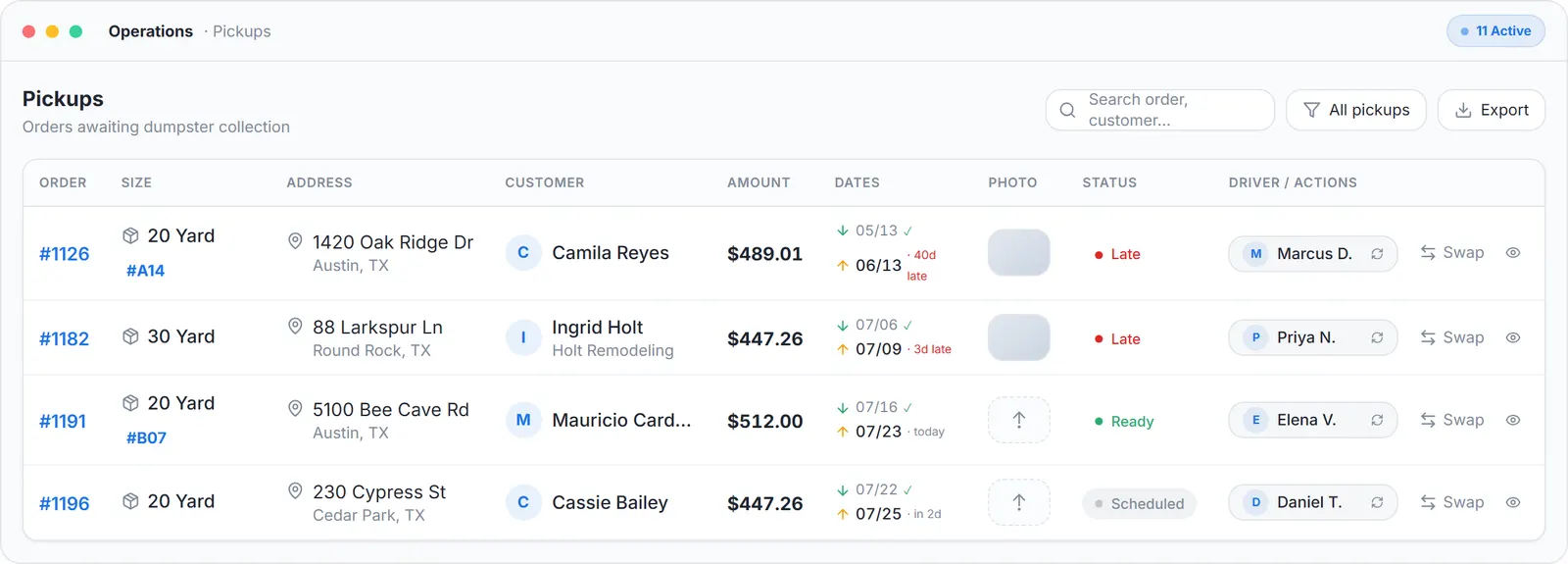
Operations view, sample data.
When the schedule changes: late, swaps, the customer's request
Three things move a date after the order exists. Each one has a screen, and none of them changes anything silently.
Late
An order whose date passed without completion is late, and the software says so in four places: the Late chip in Operations, a Late header in the Dispatch pool where late tasks carry forward onto today's board, a red LATE chip on the driver's task card, and the Dashboard alerts card that also feeds the bell icon on every page.
On a phone, the Dispatch overview shows a red Late counter with the message assign or reschedule them. Nothing late falls off the board by itself.
Swaps
When a full can needs an empty one, Swap on the pickup card creates the replacement delivery in one dialog. The new pickup date auto-fills to match the original rental length and stays editable, and the dialog flags when the rental period differs from the original.
The new delivery task inherits the driver already assigned to the pickup, so one trip handles the drop and the collection. The two tasks are linked as swap peers.
The customer's request
Every order has a no-login tracking link, usually delivered by text, that shows the dates and the step tracker. From it the customer can ask for an earlier pickup, or for a paid extension quoted at your per-day rate. Both arrive in the pickup drawer as a request with Original date against Requested date, and you Approve or Reject with a reason the customer sees.
Approving an extension moves the pickup date and records the extra days. If automatic charging is on, it charges the saved card first and only moves the date when the charge succeeds.
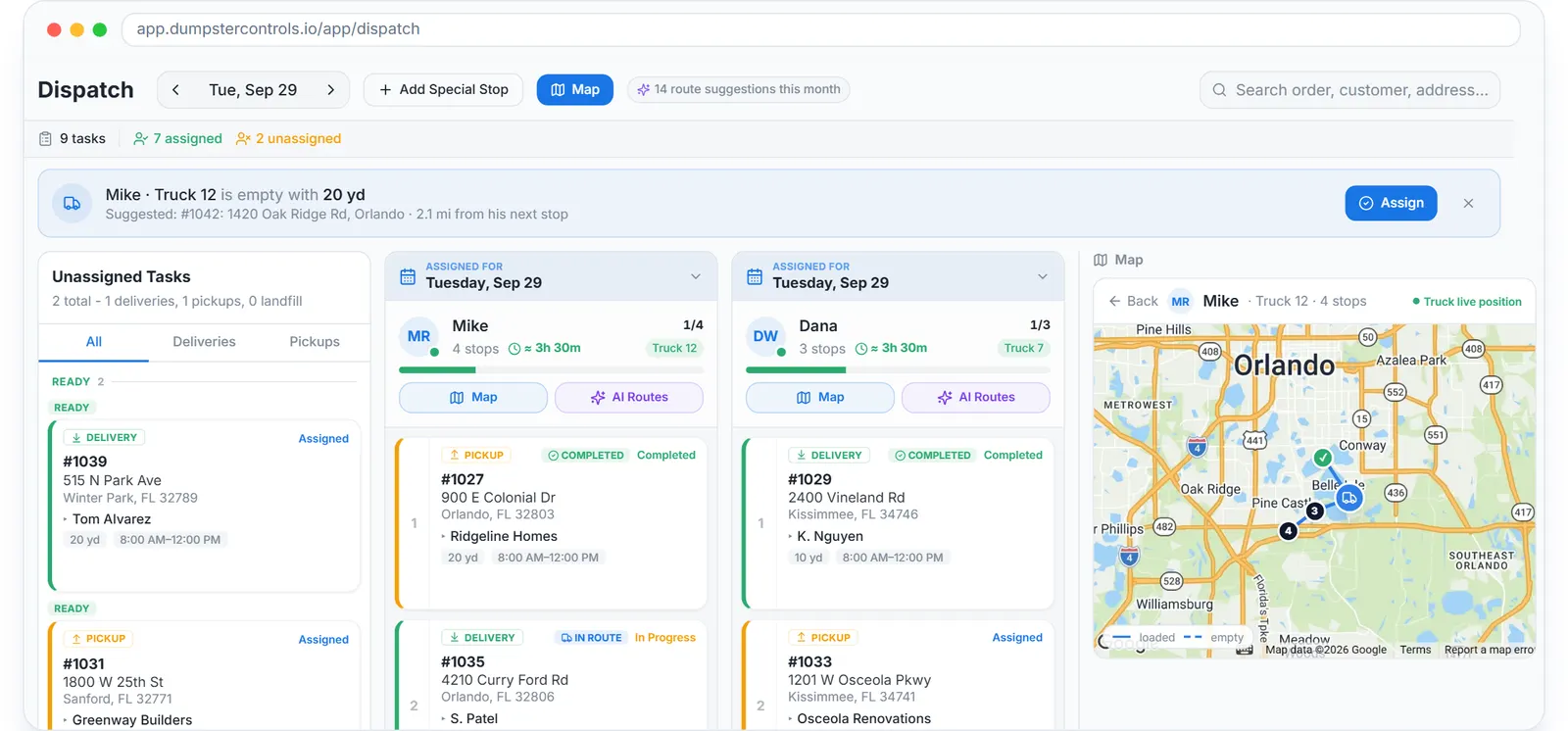
The dispatch board: late tasks carry forward under their own header, and a card dragged onto a driver is assigned.
The Free Forever Promise
Free means free. Forever.
Operations, Dispatch, the driver app, the customer tracking link and unlimited SMS and email reminders are all on the free plan.
$0
Monthly fee
Ever. No surprise charges.
$0
Setup fee
No onboarding cost.
$0
Per-user fee
Unlimited admins, drivers, dispatchers.
$0
Annual contract
Cancel anytime. We never auto-charge.
How we make money: only when you opt in, and the numbers are public. The software is free with unlimited orders and no per-order software fee. If you choose to collect a customer’s card payment through Dumpster Controls, the processing fee is 2.99% + $3.99 per card transaction on the free plan, or 2.99% + $0.30 (the standard Stripe rate) on the optional $169/month lower card rate plan. Take payment by cash, check, Zelle or any other way and you pay nothing at all. Beyond that, our revenue comes from the optional lower card rate plan and from equipment partners and sponsors advertising in the app and on our public directory; our marketplace, the Dumpster Net Hub, charges zero marketplace fees. Run your own business your way and you never pay to use the software. It’s the only model that lets a 1-truck owner-operator run on the same software as a 50-truck fleet.
Dumpster rental scheduling software: where each date lives
People also search for "dumpster rental scheduling software", and the difference is only whether you start from the rental or from the truck. Either way the same dates have to be visible to the office, the driver and the customer.
| Feature | Where it is set | Who sees it | Free plan |
|---|---|---|---|
| Delivery and pickup dates | New Order, or the booking page | Operations, Dispatch, driver app, customer tracking link | |
| Date change | Pencil on the order drawer, logged with your name | Order, dispatch task and timeline, together | |
| Driver for the day | Operations drawer or Dispatch board | Driver's lane, push and SMS to the driver | |
| Late | Automatic when the date passes | Operations chip, Dispatch Late header, driver card, Dashboard alerts | |
| Swap | Swap on the pickup card | Linked delivery inherits the driver and rental length | |
| Early pickup or extension | Customer's tracking link | Pending request in the pickup drawer until you approve | |
| Days you do not work | Weekly Schedule and Blackout Dates in Booking Page | Struck through on the public booking calendar |
Every scheduling event and the screen that owns it. All included on the free plan.
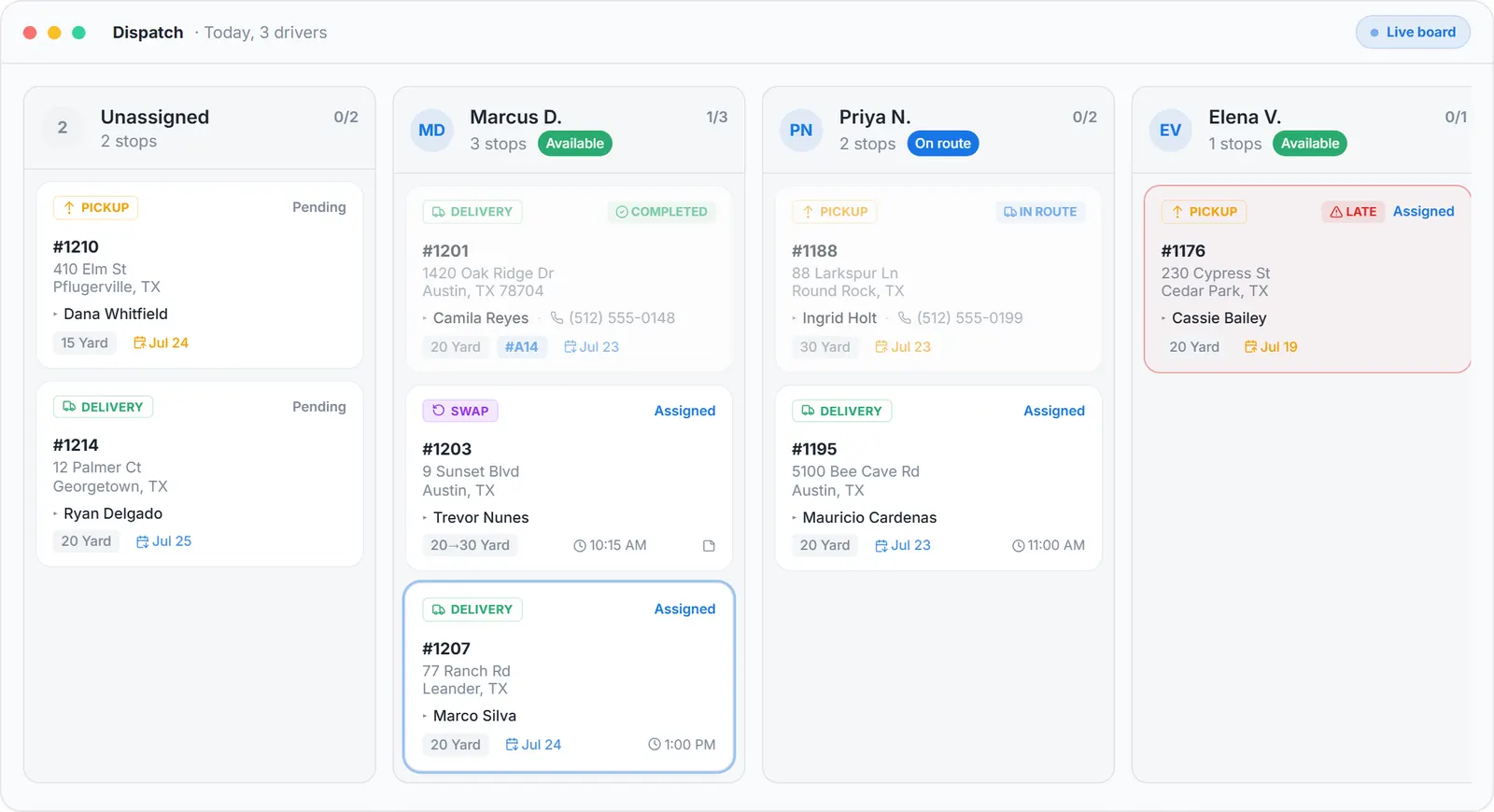
Today's deliveries and pickups by driver, sample data. The date navigator and the Upcoming chips sit above the lanes.
Days customers can and cannot book
The booking page picks delivery and pickup dates on calendars, and two settings decide what is open.
Weekly Schedule
Blocks days of the week you do not deliver.
Holidays and Blackout Dates
Flip one switch to block every national holiday for your country, United States federal holidays or Canadian holidays, reopen the ones your crew works, and click up to 60 custom dates for a vacation week or a maintenance day.
Blocked dates are struck through, the quick-pick button skips to the next open day, and a computed pickup that lands on a blocked day moves to the next open one. If no open day exists in the next 90 days, the page stops suggesting and asks the customer to pick.
The booking page itself is covered on dumpster booking software.
A dumpster delivery scheduling app in your pocket: the phone side
The schedule does not need a desk. On a phone, the Dispatch overview shows three counters, No driver, Assigned and Late, with one-tap assigning, and Tresha, the built-in assistant, answers "what should I deliver today?" with the live schedule by text or voice.
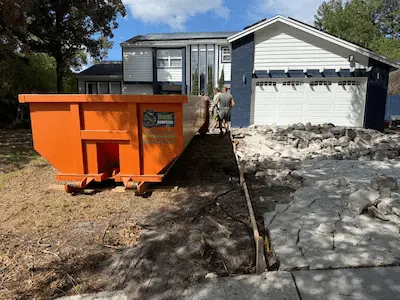
A 20 yard on a driveway. The second appointment, the pickup, is the one the schedule has to keep. Photo courtesy of Dumpster Strong , Orlando, FL 407-901-0253Used with permission.
What the schedule connects to
Invoices carry the due date, and an invoice sent with a payment link gets automatic reminders for 5 days; that side is dumpster invoicing software. Tresha, the built-in assistant, answers "what should I deliver today?" with the live schedule by text or voice. The public REST API reads orders by date range (GET /v1/orders with from and to) and sends a signed webhook on order.status_changed.
The container side, sizes, units by serial and what is available on a given date, is at dumpster rental inventory software, and junk jobs sit in the same lanes as dumpster stops, covered at software for junk removal. The driver's side is the dumpster driver app, and dumpster rental software cost shows what scheduling costs elsewhere per month.
Keep reading
- How to simplify scheduling for a dumpster rental service
- How to automate scheduling for a waste management business
- How to manage roll-off service bookings
Dumpster scheduling software: FAQ
Topicsdumpster scheduling software schedule dumpster deliveriesdumpster delivery scheduling app dumpster rental scheduling software schedule dumpster deliveries and pickupsroll off scheduling software dumpster dispatch software