ROLL-OFF BOOKINGS, FREE
How to manage roll-off service bookings
A roll-off booking is a delivery, a rental clock, maybe a swap, a pickup and a landfill run. Here it is one order, whether it came from your booking page, your office or a sentence spoken to Tresha.
- Booking page, office form or Tresha by voice: same order
- Delivery and pickup tasks created with the order
- Swap from the pickup card in seconds
- Landfill receipt read by the app, overweight billed to the saved card
Get the Free SoftwareSee features
4.7 on the App Store Available in all 50 US states and Canada
Last updated September 27, 2026 Published by Dumpster Controls, built by a software group led by a founder with 20+ years in enterprise IT who also ran a roll-off business for four years
In Dumpster Controls, a roll-off booking is one order that carries the whole service: the delivery, the pickup date, any swap in between, the extension the customer asks for and the landfill run at the end. Bookings arrive from your online page, from the office by phone, or by telling Tresha, the built-in assistant, and all three land on the same Dispatch board. Free for any fleet size, in the USA and Canada.
One order for the whole service matters because of how many hands it passes through: office, dispatcher, driver, customer, a second driver, the landfill, and the invoice has to be right at the end.
How a roll-off booking runs in Dumpster Controls
- Take the booking through any of three doors. The booking page takes a paid card order with the price on the screen. The office uses Create New Order with a customer, size, dates, address and a payment method: Payment Link, Cash or Card by Phone. Or say create an order for John to Tresha and tap the confirmation card.
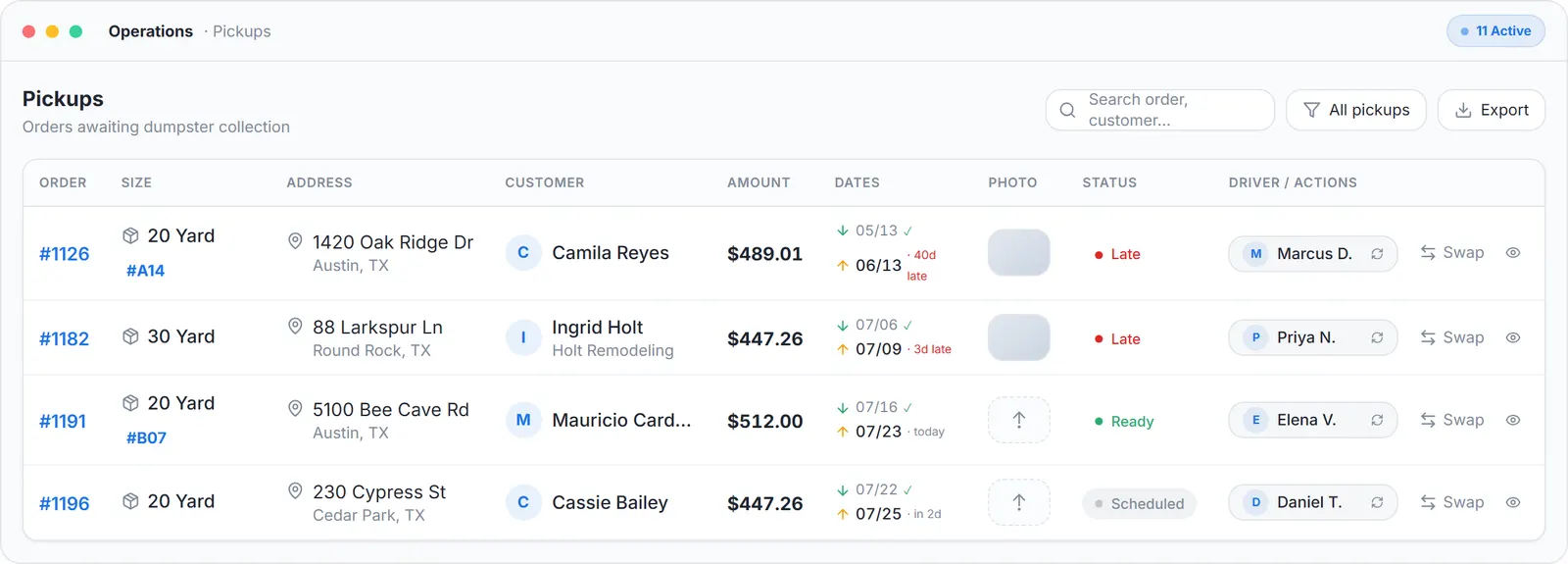
- The order creates its own tasks. Whichever door it came through, the order gets a delivery task and a pickup task on the Dispatch board and a row in Operations. A payment-link invoice goes out by email and SMS with reminders for 5 days; an online booking arrives already paid.
- Deliver and start the clock. The driver taps On My Way, navigates, taps I've Arrived, takes the required After Delivery photo, picks or scans the unit they dropped, and slides to complete. The rental clock starts and the order moves to the Pickups tab.
- Swap without a second booking. On the pickup card, Swap Dumpster creates the replacement delivery, same size at the original price or a different size from your inventory. The new delivery inherits the pickup's driver, and the two tasks are linked so one trip handles both.
- Answer the customer's requests. From the tracking link sent by text, the customer can request an earlier pickup or a paid extension at your per-day price. Approve moves the pickup date and the task; with automatic charging enabled the saved card is charged first and the dates only move if the charge succeeds.
- Pick up, dump, close. A confirmed pickup becomes a landfill run. The driver picks the landfill from a list sorted by distance and photographs the scale receipt at the gate; the app reads the net weight and cost. Overweight goes on the saved card through Charge Extra Fee.
Every step above is documented screen by screen in the manual: How to create a delivery order.
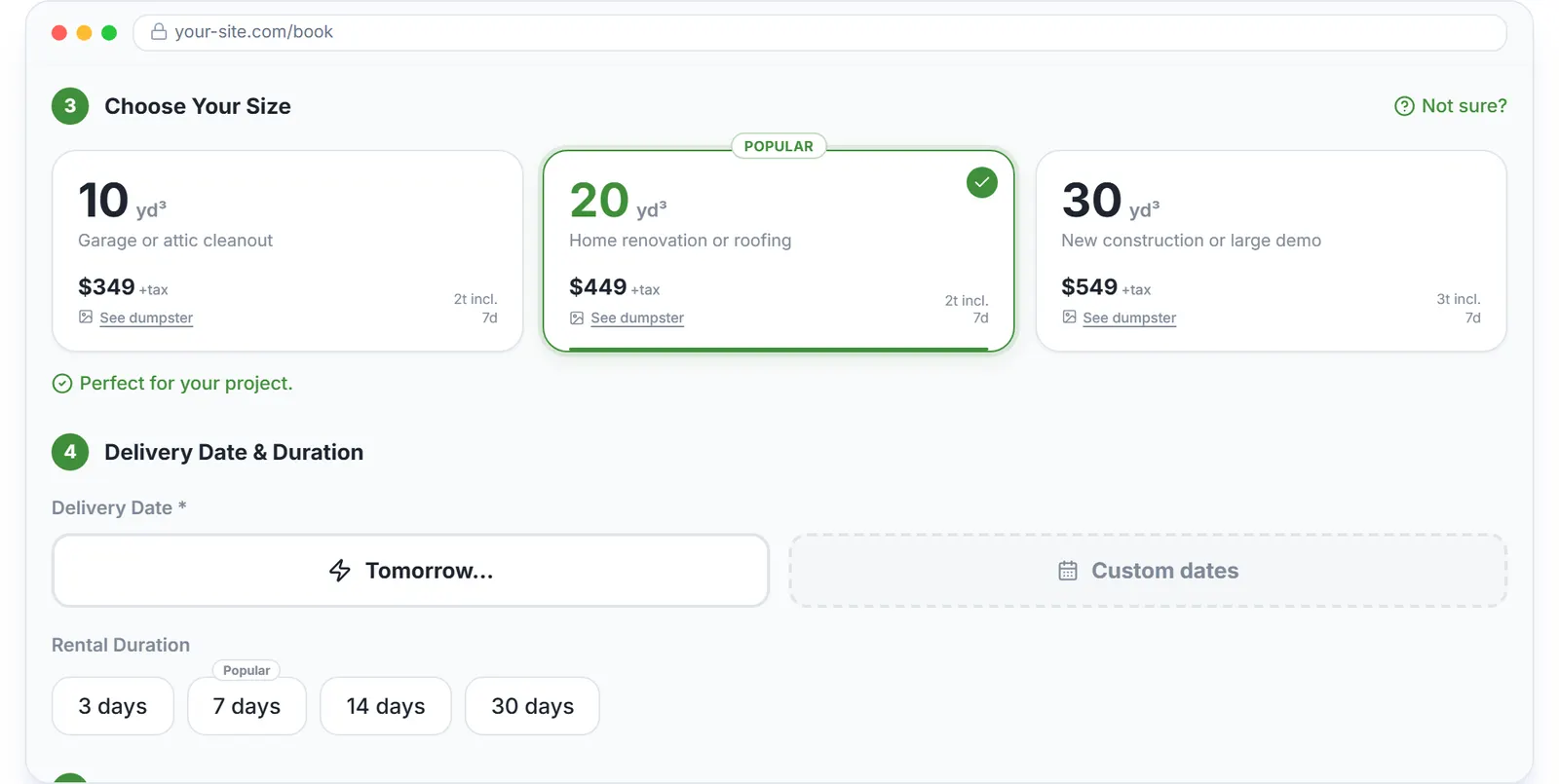
The first door: the widget on your own site, with the drop spot and the price set by the customer.
What you need
A free account
With your sizes, counts and prices in Inventory.
Drivers on the free app
iOS or Android, invited from the team page.
An approved Stripe payout account
For online bookings, payment links and saved-card charges; cash orders need nothing.
Your usual landfills starred
So they sort first on landfill runs.
Where this fits
This page follows one booking end to end. The container side of the same work, every can by serial through empty, delivered, full, stored and back, is at roll-off container software, and the management view is roll-off management software. What roll-off vendors charge per month is on dumpster rental software cost.
Next guide: how to track containers and inventory for a hauling company.
How to manage roll-off service bookings: FAQ
Topicsroll-off service bookingsmanage roll-off bookingsroll-off dumpster ordersroll-off booking software free roll-off software