CONTAINER INVENTORY SOFTWARE, FREE FOR ANY FLEET SIZE
Roll off container software: every can, empty to full and back
The can is the unit of work in a roll off company. This roll off container software follows each one by serial through the cycle it repeats every rental: at the yard, delivered, full on the truck, at the landfill, back. The screen at the top of this page is the real one, with sample data.
- Serials like 20YD-03, QR stickers, scan at delivery and pickup
- At the yard, delivered, waiting landfill, back: the row moves by itself
- Landfill receipt scanned, weight and cost on the order
- Free for any fleet size: no per-container fee, no monthly fee
Track Containers FreeSee features
4.7 on the App Store Available in all 50 US states and Canada
Last updated September 27, 2026 Published by Dumpster Controls, built by a software group led by a founder with 20+ years in enterprise IT who also ran a roll-off business for four years
Roll off container software is container inventory software built for a roll off company: each can gets a serial number and a status, and the status moves every time a driver touches it, from the yard to the customer to the landfill and back. In Dumpster Controls that is the Inventory page, the Operations board and the driver app together, free for any fleet size, with no per-container fee. The screen at the top of this page is the real one, with sample data. The question "how many twenties do we have free on Thursday" stops depending on anyone's memory.
This page is about the container's life: registration, the states it moves through, swaps, storage and what the record tells you at month end. Where a container is right now, and how trucks are followed by GPS, has its own page at dumpster tracking software.
What you get on day one
- Every size registered in one wizard, with prices, tonnage and overage
- Every physical can as a unit with a serial like 20YD-01
- QR stickers printed per serial, scanned at delivery and pickup
- The pickup guard: the wrong can is refused with the expected serial shown
- Swaps as linked orders on one stop, same driver kept
- Store for Later for full cans that miss the landfill
- Late status computed from the date, never set by hand
- Free: unlimited units, unlimited sizes, no per-container fee
Counted in our production database on October 1, 2026. Updated monthly.
2,700+
Dumpsters tracked by serial
400+
Companies on Dumpster Controls
140+
Trucks registered
35 states + Canada
Where it runs
Container inventory software: sizes first, then every physical can
Registration takes one wizard per size, and the units under it are created by themselves. A price change is made once and feeds booking, new orders and invoices from that moment.
- 1
#### 01. Register the size
Yardage, how many you own, a photo, and prices for 24 hours, 3, 7, 14 and 30 days plus the daily charge after that, included tonnage, per-ton overage and any extra fees. - 2
#### 02. Units get serials by themselves
20YD-01 through 20YD-05 for five twenties. Each unit is a row with Serial #, Status, Condition and Notes. - 3
#### 03. Fix the labels you already use
Rename one serial with the pencil icon, or Renumber All to give a whole size a clean sequence after years of odd labels. - 4
#### 04. Print the stickers
The QR icon next to any serial prints a sticker with the serial in large type and the code the driver scans. A plus and minus stepper adjusts the count when you buy or sell cans.
The Free Forever Promise
Free means free. Forever.
Sizes, units, serials, QR stickers, swaps and storage are all on the free plan. No inventory module fee, no per-container surcharge, unlimited cans.
$0
Monthly fee
Ever. No surprise charges.
$0
Setup fee
No onboarding cost.
$0
Per-user fee
Unlimited admins, drivers, dispatchers.
$0
Annual contract
Cancel anytime. We never auto-charge.
How we make money: only when you opt in, and the numbers are public. The software is free with unlimited orders and no per-order software fee. If you choose to collect a customer’s card payment through Dumpster Controls, the processing fee is 2.99% + $3.99 per card transaction on the free plan, or 2.99% + $0.30 (the standard Stripe rate) on the optional $169/month lower card rate plan. Take payment by cash, check, Zelle or any other way and you pay nothing at all. Beyond that, our revenue comes from the optional lower card rate plan and from equipment partners and sponsors advertising in the app and on our public directory; our marketplace, the Dumpster Net Hub, charges zero marketplace fees. Run your own business your way and you never pay to use the software. It’s the only model that lets a 1-truck owner-operator run on the same software as a 50-truck fleet.
The cycle every roll off container repeats
The Operations page runs the day in three waiting states that match the street: Waiting Delivery, Waiting Pickup and Waiting Landfill. A fourth section, Stored Full Dumpsters, holds the cans that came back full and did not reach the landfill that day.
| Feature | Where it shows | What moves it | Free plan |
|---|---|---|---|
| Empty in the yard (unit free) | Inventory, unit row with no order | Registration, or a completed landfill run | |
| Waiting delivery | Operations, Deliveries tab | An order is created or booked online | |
| At the customer (waiting pickup) | Pickups tab, unit shows the Order # | Driver slides to complete the delivery and picks the unit | |
| Full on the truck (waiting landfill) | Landfill tab, Landfill Runs | Driver completes the pickup; the landfill task is created | |
| Stored full at the yard | Landfill tab, Stored Full Dumpsters | Driver taps Store for Later with the storage address | |
| Swapped | Deliveries tab, new order marked as a swap | Swap button on the pickup row; same driver kept | |
| Empty again | Inventory, unit free; truck marked empty | Driver submits the landfill receipt and slides to complete |
The states a roll-off container moves through in Dumpster Controls, who moves it, and where it shows. All on the free plan.
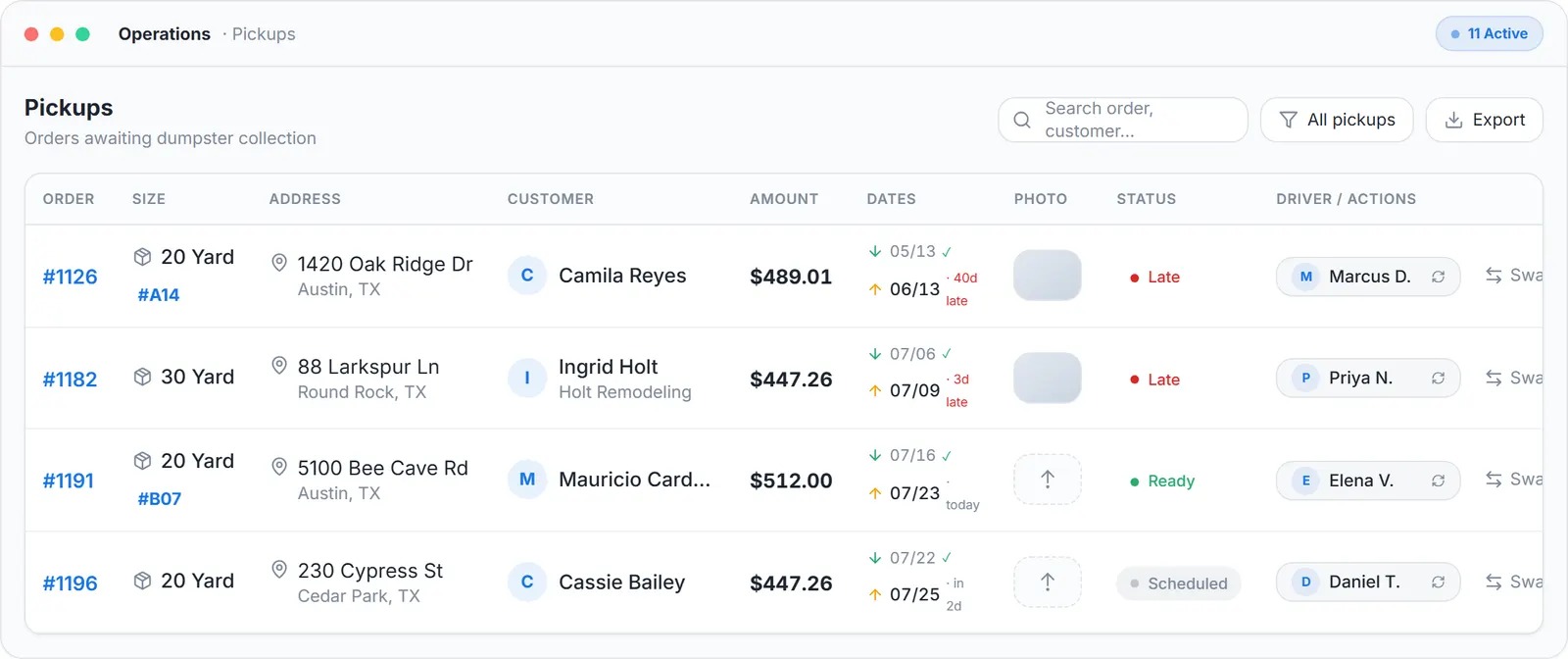
The real Operations screen, sample data.
Roll off container tracking: which cans sit idle
People search for "roll-off container tracking software" when they want the record read from the other end: not "what state is this can in" but "which cans are earning nothing". The units list answers it without a report.
Idle units, one glance
Every row whose status shows the unit as free, with no order number, is a can earning nothing. Six free 30-yard rows on a Tuesday in season is the report.
Booking stays honest
A size with no free unit is hidden from the public booking page instead of being sold twice.
Spreadsheet when you want one
The Operations tabs export to CSV, so the same list goes into a spreadsheet for the accountant or the yard board.
Roll off dumpster tracking software: containers by status, trucks by GPS
The "dumpster tracking" phrasing usually means location, and it is worth being exact about what is tracked how.
Containers: status and last address
No GPS device on the can. A container's position is the delivery address of the order it is bound to, confirmed by the GPS stamp on the driver's drop photo.
Every green or orange marker on the map is a container at a customer address.
Trucks: live on the map
Positions come from the driver's phone while a route is running, refreshed about every 30 seconds. The board marks a truck loaded from the pickup until the landfill run or the storage drop completes.
The route map draws a loaded leg solid and an empty leg dashed.
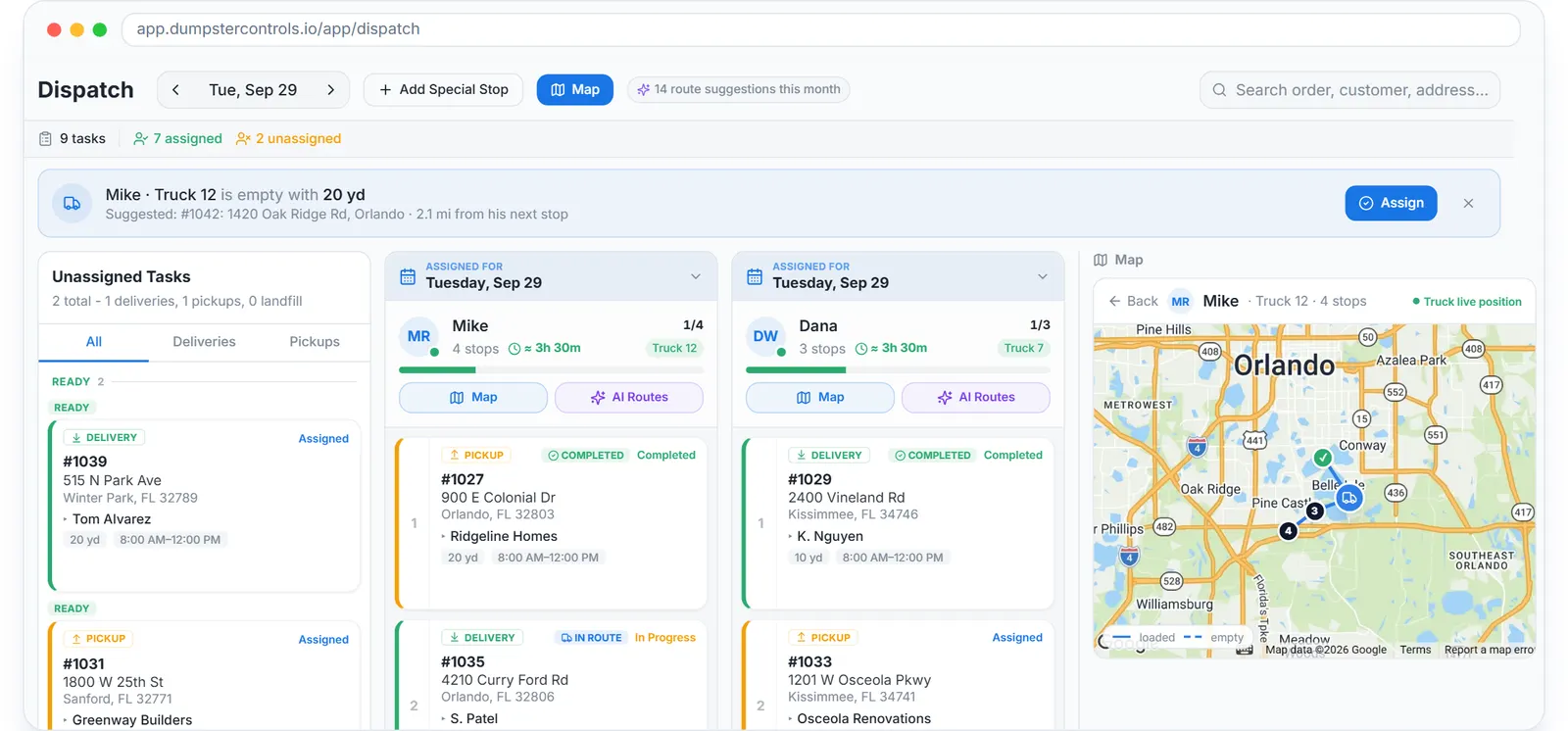
The real dispatch board, drag a card to assign, sample data.
Box tracking software: history and cost per box
Haulers who call their cans "boxes" search for box tracking software, and the record is the same. What the box record adds beyond location is history and cost.
Disposal cost lands on the box
On a dump run the driver photographs the scale receipt, the app reads the net weight and the total, and both land on the order. That is how the cost of one box on one job reaches Orders P&L without typing.
Condition and Notes
The unit row holds what the yard knows about the can: door hinge, floor patch, the customer who dented it.
In use, cannot be deleted
A unit on an active order answers Cannot remove, the unit is currently in use, until its order is completed or reassigned.
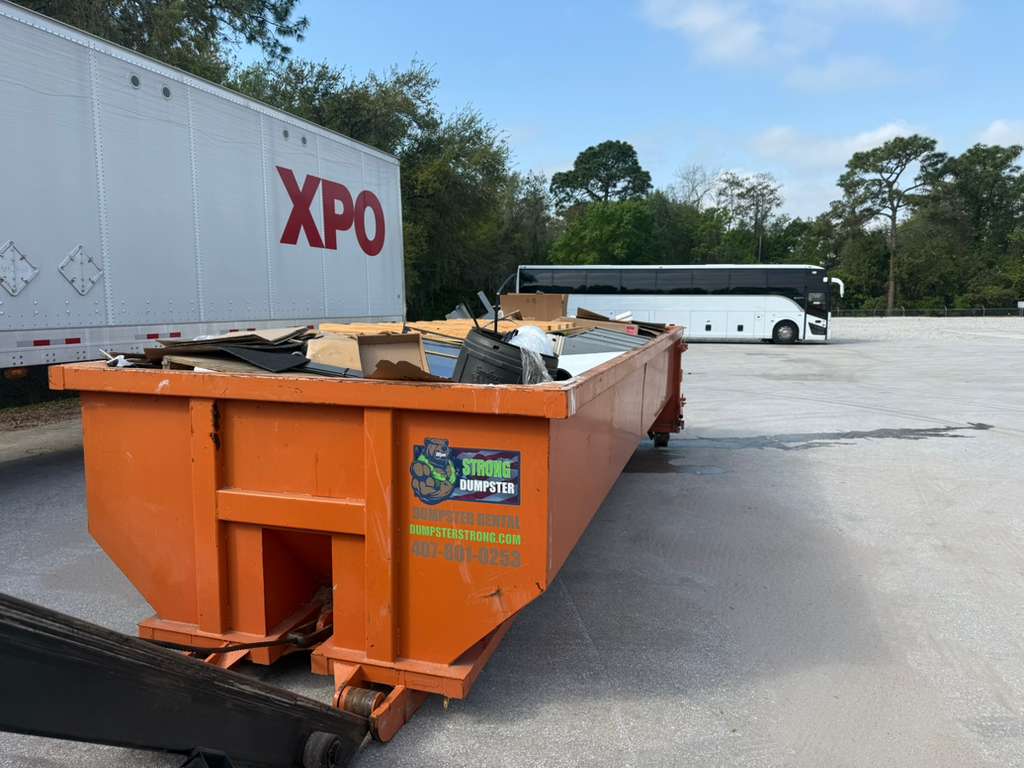
A Dumpster Strong roll-off loaded with construction debris, ready for the landfill run. The unit stays in Waiting Landfill until the receipt is scanned. Photo courtesy of Dumpster Strong , Orlando, FL 407-901-0253Used with permission.
What the container record connects to
Every state change is an event a driver made in the roll-off driver app, so the unit picker sits inside the delivery flow, not on a separate screen. The app's full feature list, GPS included, is at dumpster driver app, and orders arrive from dumpster booking software.
The money side, extension days and overweight fees per order, is covered in roll-off dumpster software; the whole operation from the office chair in roll-off management software and dumpster rental software. What the software costs, against every vendor's published price, is at dumpster rental software cost.
Keep reading
- How to track containers and inventory for a hauling company
- How to increase dumpster fleet utilization
- Dumpster rental inventory software: the setup screens
Roll off container software: FAQ
Topicsroll off container software roll off container tracking container inventory software roll off dumpster tracking software box tracking software roll off inventory software container serial number tracking free roll off software