SCHEDULING AUTOMATION, FREE
How to automate scheduling for a waste management business
The schedule builds itself around the order: tasks are created when the booking is, the next stage is created when the last one completes, the driver is told at every change, and the customer can ask for a date without calling.
- Delivery and pickup tasks created with the order, from any channel
- Late, Ready for this day and Scheduled ahead sorted for you
- Landfill run created when the pickup completes
- Roll-off, junk and scrap on one board; not curbside routes
Get the Free SoftwareSee features
4.7 on the App Store Available in all 50 US states and Canada
Last updated September 27, 2026 Published by Dumpster Controls, built by a software group led by a founder with 20+ years in enterprise IT who also ran a roll-off business for four years
In Dumpster Controls, scheduling automates itself around the order. The booking creates the delivery and pickup tasks, the delivery starts the rental clock, a confirmed pickup creates the landfill run, and the customer's extension request moves the pickup date when you approve it. It is built for roll-off, junk and scrap haulers with stop-based days, not municipal collection routes, and it is free for any fleet size.
Automation here does not mean a rules engine you configure. Each stage of a job creates the next one, the way the work itself does: a delivery implies a pickup, a full can implies a landfill run, and an assignment implies a driver who needs to know.
How scheduling automation works in Dumpster Controls
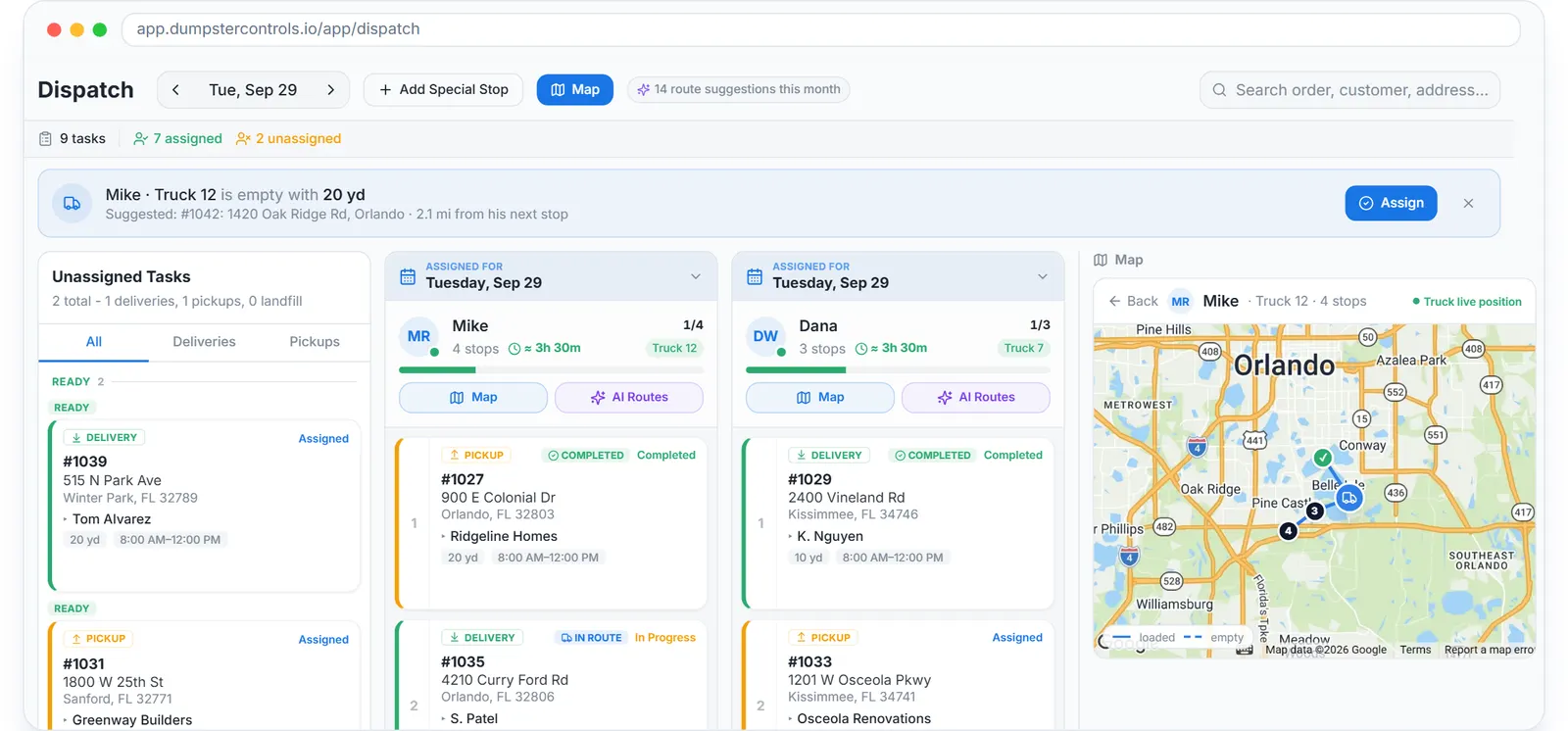
- The order creates the tasks. An online booking, an office order or an order dictated to Tresha all create a delivery task and a pickup task on the Dispatch board, with the dates the order carries. The server checks the rules: no delivery in the past, no pickup before the delivery, no online booking on a day you blacked out.
- The pool sorts itself by urgency. Unassigned Tasks groups work under Late, Ready for this day, Scheduled ahead and Stored, waiting landfill, with tabs for Deliveries, Pickups, Landfill and Junk. Upcoming chips appear for future days that already have assigned work.
- Assignment notifies without you. Drop a card in a lane or tap Assign and pick a driver. The task turns from Pending to Assigned, and the driver gets a Task Assigned push notification with the address and, for order tasks, an SMS.
- Completion creates the next stage. When the driver slides to complete a delivery, the order moves to Pickups and the rental clock starts. The moment a pickup of a full can completes, the dimmed LANDFILL card marked NEXT becomes a real, assignable landfill task.
- Customers move dates by asking. From the tracking link sent by text, the customer requests an earlier pickup or a paid extension at your per-day price. Approve moves the pickup date and its task together and, with automatic charging on, bills the saved card first.
- Junk jobs schedule on the same board. Junk removal jobs carry a blue badge, a J- number and a load fraction instead of a size. They drag into the same lanes, count toward the driver's day estimate, and notify the crew with a Junk Job Assigned push.
Every step above is documented screen by screen in the manual: How to open and read the Dispatch board.
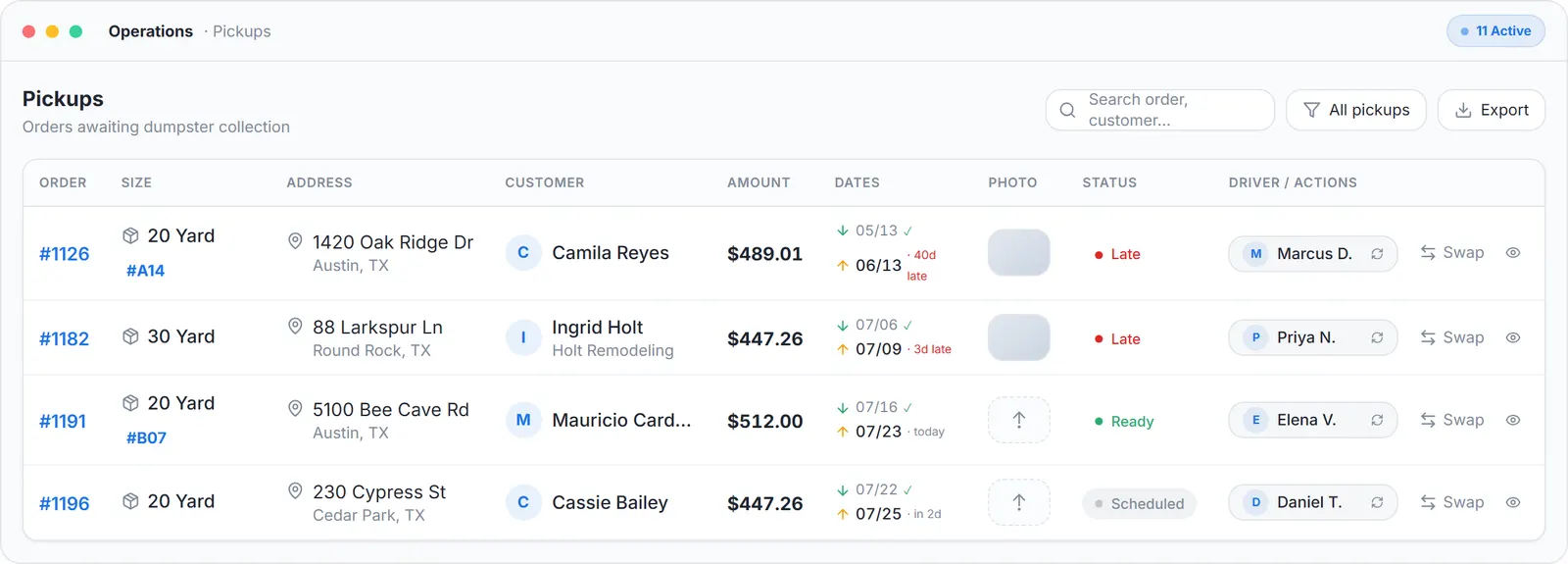
What the automation produces for the office: every pickup with its date, its status and its driver, nothing typed twice.
What you need
A free account
With sizes and prices in Inventory, so orders carry a price.
Drivers on the free app
iOS or Android, so assignments reach them.
Your headquarters address
Every day starts and ends at the yard.
Stripe, optionally
Only if you want extension requests charged automatically.
Where this fits
The dates themselves, delivery, pickup, swap, late flags and blackout days, are covered at dumpster scheduling software; the board where the automated tasks land is at waste management dispatch software, and the wider product for hauling companies is waste management software. What scheduling costs elsewhere per month is on dumpster rental software cost.
Next guide: how to simplify scheduling for a dumpster rental service.
How to automate scheduling for a waste management business: FAQ
Topicsautomate scheduling waste management waste management scheduling software hauler scheduling automation dumpster scheduling software free waste management software