DISPATCH OPERATIONS, FREE
How to improve dispatch operations for a waste management company
One board, one lane per driver, a live map beside it. Assign by drag, click or a tap on the phone, watch the projected finish time move, and handle the exceptions without leaving the screen.
- Pool on the left, one lane per driver, map on the right
- Projected finish time per driver, updated live
- Special stops, stored cans and forgotten completions handled in place
- Junk jobs and dumpster tasks on the same board
Get the Free SoftwareSee features
4.7 on the App Store Available in all 50 US states and Canada
Last updated September 27, 2026 Published by Dumpster Controls, built by a software group led by a founder with 20+ years in enterprise IT who also ran a roll-off business for four years
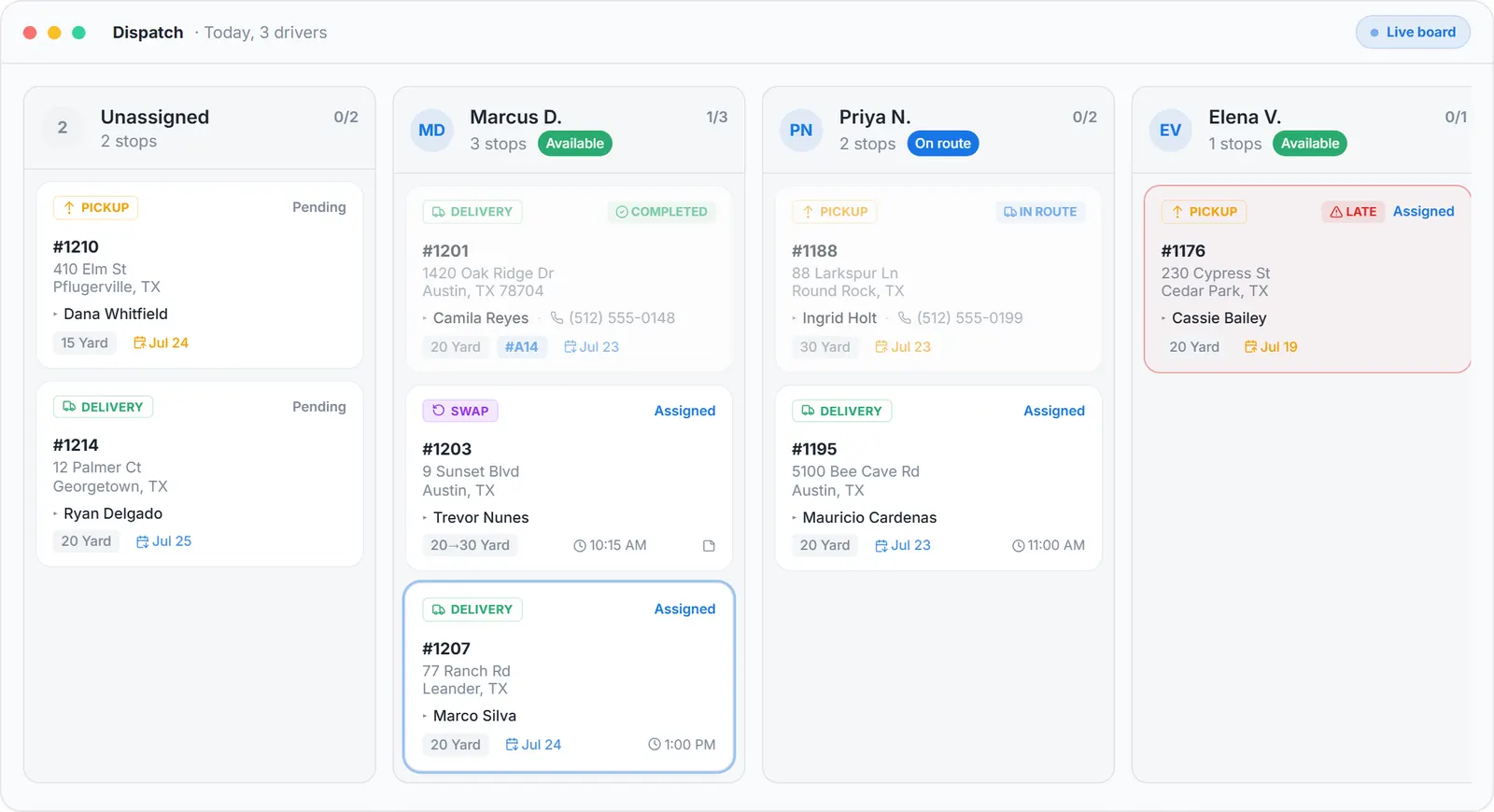
In Dumpster Controls, dispatch is one board: the unassigned pool on the left, one lane per driver with a progress bar and a projected finish time, and a live map beside it that shows where every truck is and whether it is carrying a can. Assigning is a drag, a click or a tap on the phone, the driver is notified at once, and completed stops appear on the board as they happen. It is free for any fleet size.
The improvement is not a faster spreadsheet. It is that the board, the map, the driver's phone and the customer's text all read the same task, so a change made once is the change everywhere.
How dispatch operations work in Dumpster Controls
- Read the board in one pass. The top bar has the date navigator, Add Special Stop, the Map toggle and a search box. The pool has tabs for Deliveries, Pickups, Landfill and Junk, grouped under Late, Ready for this day, Scheduled ahead and Stored, waiting landfill. Each lane shows the driver's status chip, a completed of total counter and a projected finish time.
- Assign three ways. Drag a card into a lane and drop it at the position it should run. Or click Assign on any card to open the Assign to sheet, which lists every driver with their current stop count. Or open the task details and assign from there; the driver gets a Task Assigned push and an SMS.
- Keep the map open while you plan. The map panel sits beside the board, resizable, and remembers its width. With no driver selected it shows the whole operation; click a driver's block and it draws that route with numbered pins, drive times and the live truck marker.
- Put non-order work on the route. Add Special Stop creates a Custom, Landfill or HQ stop with a title, an address, notes, a time window and a priority, assigned to a driver or dropped in the pool. It draws in blue on the map.
- Handle the full can with nowhere to go. When the landfill is closed or the day ran out, Store Full Dumpster on the landfill task records a storage address, sends the task back to the pool under Stored, waiting landfill, and resets the truck to empty. Assign it another day and the route adds a Pick up stored dumpster point.
- Close what the driver missed. Open the card and slide to complete; the audit log records who confirmed it, and a completed pickup makes its landfill run real. Tresha does the same from a chat: tell her a stop is done, check the card, confirm.
Every step above is documented screen by screen in the manual: How to open and read the Dispatch board.
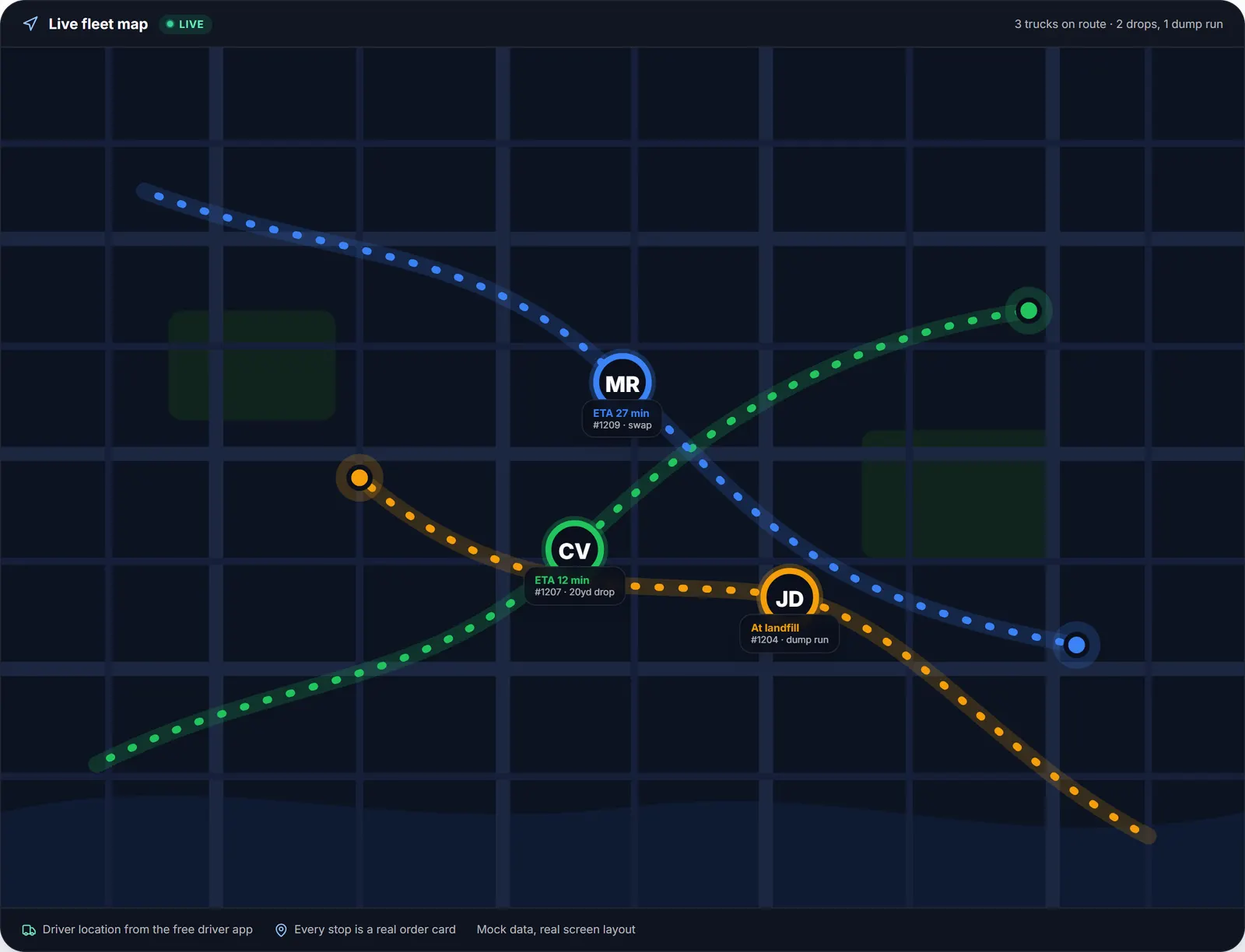
The map the dispatcher keeps open: every truck, its ETA and whether it is carrying a can.
What you need
A free account
With at least one driver invited to the free iOS or Android app.
Your headquarters address
Every route starts there.
Your active landfills
So Set landfill and special landfill stops have something to pick from.
A desktop for drag-and-drop
The phone covers assigning and reordering away from the desk.
Where this fits
The board zone by zone, the lane table and the sanitation caveat are at waste management dispatch software; the dumpster-specific guide is dumpster dispatch software, and the routing tools on the same board are at waste management routing software. Per-dispatcher and per-truck prices from other vendors are on dumpster rental software cost.
Next guide: dispatch and route planning tools for waste management services.
How to improve dispatch operations for a waste management company: FAQ
Topicsimprove dispatch operations waste management waste management dispatch technology dispatch board haulerswaste management dispatch software free dispatch software