DISPATCH OPERATIONS, FREE

    How to improve dispatch operations for a waste management company

    One board, one lane per driver, a live map beside it. Assign by drag, click or a tap on the phone, watch the projected finish time move, and handle the exceptions without leaving the screen.

    • Pool on the left, one lane per driver, map on the right
    • Projected finish time per driver, updated live
    • Special stops, stored cans and forgotten completions handled in place
    • Junk jobs and dumpster tasks on the same board
    4.7 on the App Store(12 ratings, Sep 2026)Available in all 50 US states and Canada
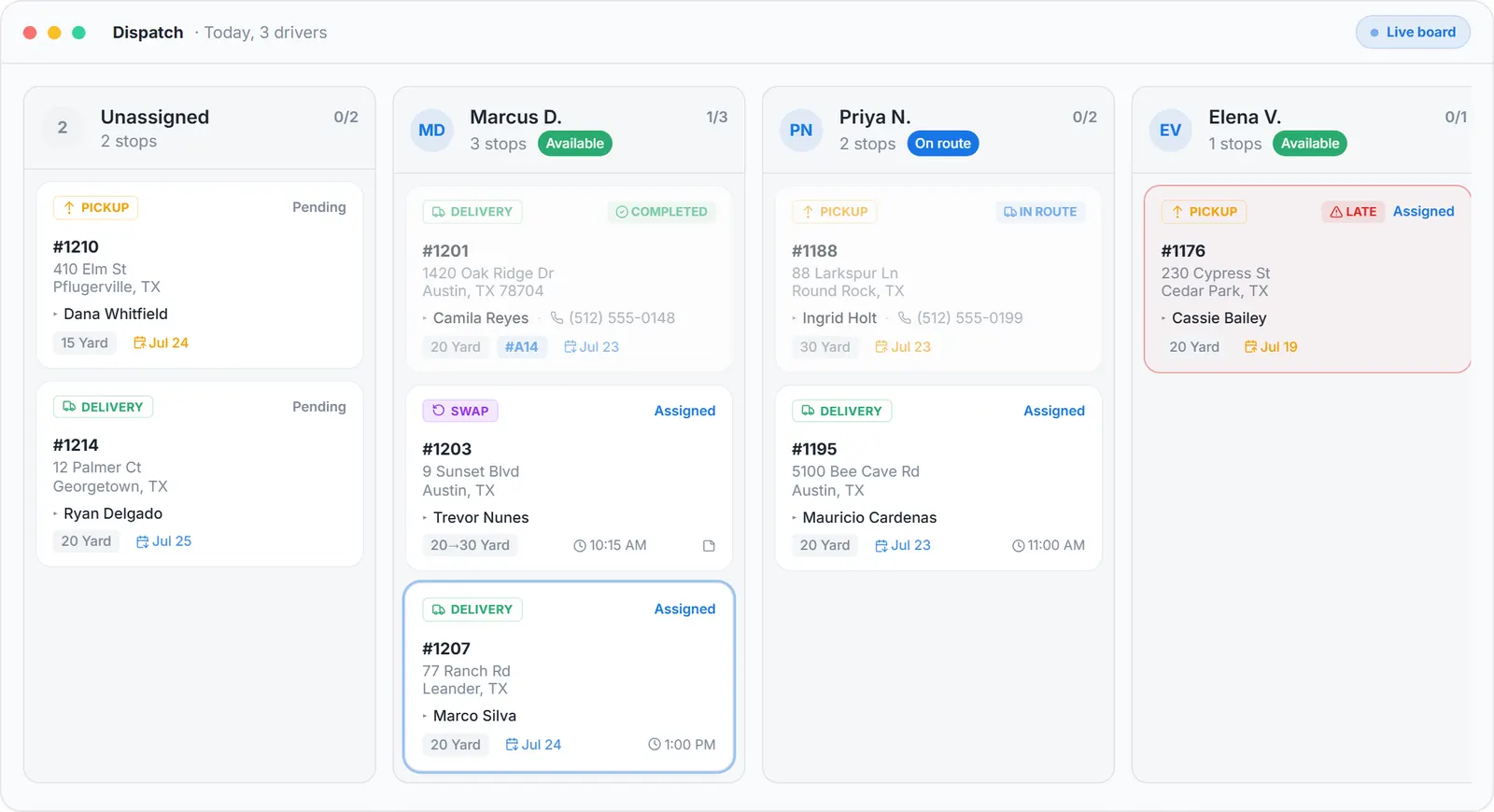
    Improved dispatch operations for a waste management company: the Dispatch board with today's deliveries, pickups and a swap in one lane per driver, one pickup flagged late
    Real screen: three drivers, one late pickup, the whole day on one board
    Last updated Published by Dumpster Controls, built by a software group led by a founder with 20+ years in enterprise IT who also ran a roll-off business for four years

    In Dumpster Controls, dispatch is one board: the unassigned pool on the left, one lane per driver with a progress bar and a projected finish time, and a live map beside it that shows where every truck is and whether it is carrying a can. Assigning is a drag, a click or a tap on the phone, the driver is notified at once, and completed stops appear on the board as they happen. It is free for any fleet size.

    The improvement is not a faster spreadsheet. It is that the board, the map, the driver's phone and the customer's text all read the same task, so a change made once is the change everywhere.

    How dispatch operations work in Dumpster Controls

    1. Read the board in one pass. The top bar has the date navigator, Add Special Stop, the Map toggle and a search box. The pool has tabs for Deliveries, Pickups, Landfill and Junk, grouped under Late, Ready for this day, Scheduled ahead and Stored, waiting landfill. Each lane shows the driver's status chip, a completed of total counter and a projected finish time.
    2. Assign three ways. Drag a card into a lane and drop it at the position it should run. Or click Assign on any card to open the Assign to sheet, which lists every driver with their current stop count. Or open the task details and assign from there; the driver gets a Task Assigned push and an SMS.
    3. Keep the map open while you plan. The map panel sits beside the board, resizable, and remembers its width. With no driver selected it shows the whole operation; click a driver's block and it draws that route with numbered pins, drive times and the live truck marker.
    4. Put non-order work on the route. Add Special Stop creates a Custom, Landfill or HQ stop with a title, an address, notes, a time window and a priority, assigned to a driver or dropped in the pool. It draws in blue on the map.
    5. Handle the full can with nowhere to go. When the landfill is closed or the day ran out, Store Full Dumpster on the landfill task records a storage address, sends the task back to the pool under Stored, waiting landfill, and resets the truck to empty. Assign it another day and the route adds a Pick up stored dumpster point.
    6. Close what the driver missed. Open the card and slide to complete; the audit log records who confirmed it, and a completed pickup makes its landfill run real. Tresha does the same from a chat: tell her a stop is done, check the card, confirm.

    Every step above is documented screen by screen in the manual: How to open and read the Dispatch board.
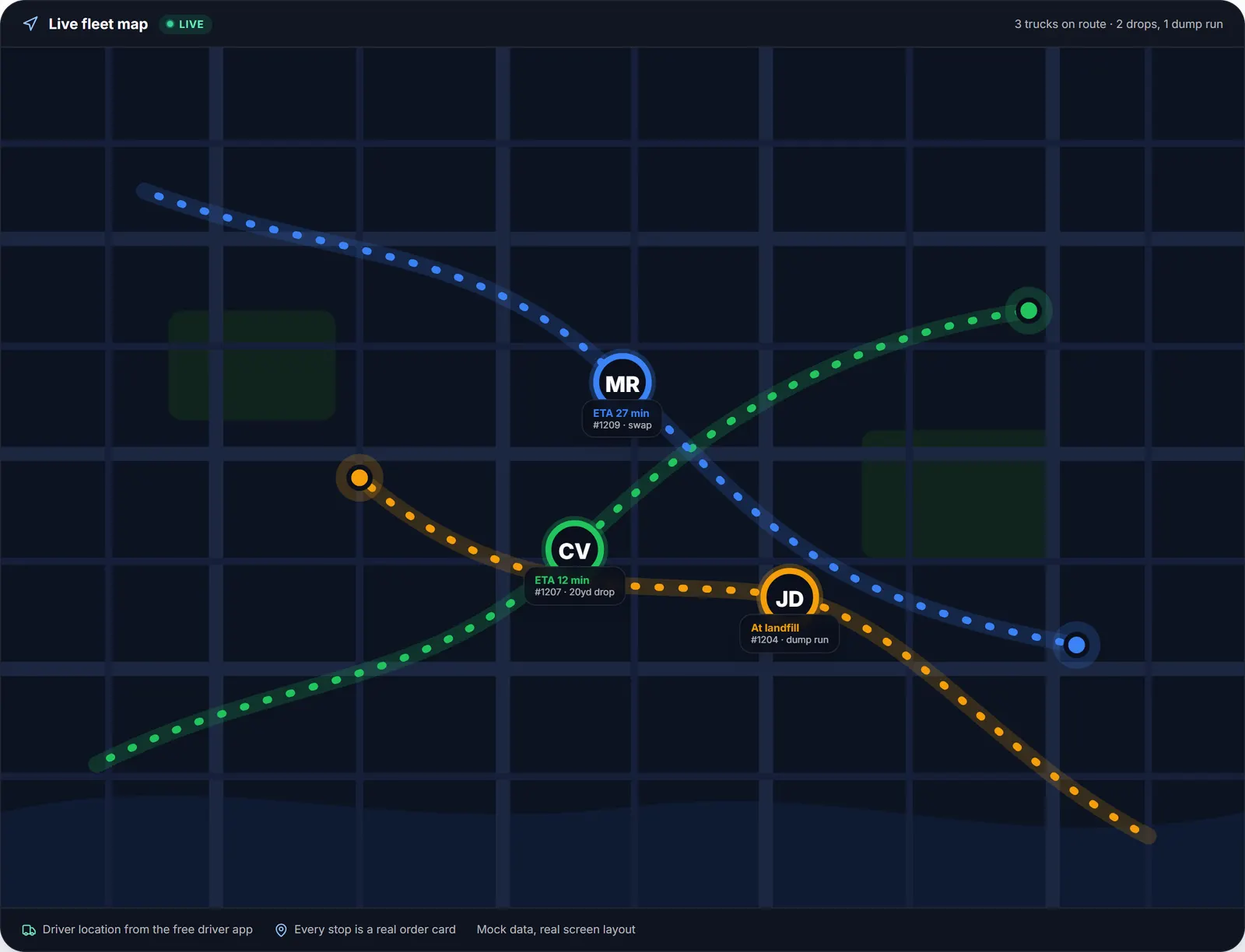
    The live map beside the waste management dispatch board: trucks on route with ETAs, a 20 yard drop, a swap and a dump run at the landfill
    The map the dispatcher keeps open: every truck, its ETA and whether it is carrying a can.

    What you need

    A free account

    With at least one driver invited to the free iOS or Android app.

    Your headquarters address

    Every route starts there.

    Your active landfills

    So Set landfill and special landfill stops have something to pick from.

    A desktop for drag-and-drop

    The phone covers assigning and reordering away from the desk.

    Where this fits

    The board zone by zone, the lane table and the sanitation caveat are at waste management dispatch software; the dumpster-specific guide is dumpster dispatch software, and the routing tools on the same board are at waste management routing software. Per-dispatcher and per-truck prices from other vendors are on dumpster rental software cost.

    Next guide: dispatch and route planning tools for waste management services.

    How to improve dispatch operations for a waste management company: FAQ

    Explore the platform

    Software for Dumpster Companies

    The #1 free software built specifically for dumpster rental companies.

    Software for Junk Removal

    Free crew app, on-site quoting and dispatch built for junk haulers.

    Software for Scrap Metal Companies

    Scrap orders with no charge, pickup only or container drop off, free. In beta.

    Dumpster Rental Software 2026

    The 2026 generation: AI dispatch, free software and marketplace.

    Dump Trailer Rental Software

    The only free software for dump trailer rental businesses of any fleet size.

    Free Dumpster Rental Software

    The only free platform built for roll-off haulers of any fleet size.

    Dumpster Rental Software

    All-in-one system for orders, dispatch, billing, and growth.

    Dumpster Dispatch Software

    Drag-and-drop board with AI-powered routing for roll-off.

    Roll-Off Dumpster Dispatch Software

    Lane-per-truck dispatch with swap logic and per-container tracking.

    Dumpster Driver App

    iOS/Android app for delivery, pickup, swap and proof of service.

    Dumpster Rental App

    The only free dumpster app for haulers of any fleet size, iOS + Android, no monthly fee.

    Dumpster Booking Software

    Embeddable widget that turns your site into a 24/7 sales engine.

    Roll-Off Dumpster Software

    Container tracking, swap logic, and landfill cost capture.

    Roll-Off Management Software

    What the software does, module by module, and what a one-truck operator needs first.

    Dumpster Management Software

    Orders, containers by serial, trucks, drivers, landfill runs and money in one system.

    Dumpster Rental Software Cost

    Every vendor's published price, dated and sourced, and what a three-truck company pays a year.

    Hauling Software

    Roll-off, junk removal and scrap on one board, one driver app and one profit report.

    Waste Hauling Software

    Features, pricing, reviews, demo and the 13 other providers, with prices on the cost page.

    Waste Management Software

    For small and mid-size haulers, and why enterprise suites are a different product.

    Waste Management Dispatch Software

    The board lane by lane, the route map colors and AI Routes, junk on the same screen.

    Waste Management Billing Software

    Invoice at booking, payment links with 10 day reminders, extra fees, QuickBooks export.

    Waste Management CRM

    Leads from chat and the API, three profile types, lifetime value and review requests.

    Waste Management Routing Software

    Stop-based routes for roll-off and junk work, not curbside collection, with the truck cycle.

    Roll-Off Container Software

    Every can by serial through empty, delivered, full, stored and back, with swaps and idle units.

    Software for Roll-Off Companies

    The buyer's guide for roll-off operators: six modules and the three tests before you switch.

    Roll-Off Driver App

    The driver's view: four kinds of stop, unit picker by QR, receipt scan and Truck Tablet Mode.

    Container Rental Software

    The roll-off rental as a timeline, booking to landfill receipt, on one order. Not for shipping containers.

    Bin Rental Software

    For haulers who call the can a bin: CAD on your own Canadian Stripe account, postal codes, provinces.

    Junk Removal App

    The junk job on the crew's phone: load fraction, stamped photos, extra charge on site. Free, iOS and Android.

    Junk Removal CRM

    One customer record shared by junk jobs and dumpster orders, with history, notes and lifetime value.

    Free Junk Removal Software

    What free includes for a junk crew, and the one thing that costs money: card processing.

    Dumpster Scheduling Software

    Delivery and pickup dates, swaps, late flags and customer date requests you approve.

    Dumpster Rental Software for Small Business

    One truck to five at $0 a month, with the cost math against paid plans.

    Dumpster Rental Software in Canada

    CAD on your own Canadian Stripe account, postal codes, Canadian landfills and holidays.

    Dumpster Rental Software with QuickBooks

    Customers, invoices, payments, refunds and expenses sync one way into QuickBooks Online, totals always match.

    Dumpster Business Software

    The owner's view: net profit, margin per order, unpaid invoices and QuickBooks sync.

    Dumpster Rental Services Software

    Booking, delivery, swap and pickup with free SMS updates and stamped photo proof.

    Dumpster Invoicing Software

    Stripe-native invoicing with auto reminders and Super Invoices.

    Dumpster Financial Software

    P&L per order, bank reconciliation, expenses and KPIs, free.

    Dumpster Route Optimization

    AI route optimization that cuts empty miles 10 to 20%.

    Dumpster Tracking Software

    Per-unit serial tracking with inventory-aware booking.

    Dumpster Fleet Tracking

    Trucks, drivers and every can on one live map, no GPS hardware.

    Topicsimprove dispatch operations waste managementwaste management dispatch technologydispatch board haulerswaste management dispatch softwarefree dispatch software

    Get the only free dumpster rental software for any fleet size

    No credit card. No phone number. No contract. Sign up and start dispatching, or book a short walkthrough first.

    Free · No credit card · No contract